

NovaStar TU40 Pro Specifications: Everything You Need to Know
2026-02-26T03:52:39+00:00February 26, 2026|Tags: FAQs NovaStar|
Colorlight X8m Ultra-4K LED Video Processor Review: Performance, Features & Advantages
2026-02-02T03:18:55+00:00February 13, 2026|Tags: FAQs Colorlight|
HUIDU HD-VP620 LED Display All-In-One Video Processor
2026-02-02T03:02:40+00:00February 2, 2026|Tags: FAQs HuiDu|
- 1.Pregled Huidu HD-VP210A
- 2. Ključne karakteristike Huidu HD-VP210A
- 3.Detaljne specifikacije Huidu HD-VP210A
- 4.Preuzimanje resursa za Huidu HD-VP210A kontroler
- 5.Uputstvo za podešavanje i rad
- 6. Primjena HD-VP210A
- 7. Određivanje cijena i vrijednost ponude
- 8.Pitanja i odgovori
- 9.Conclusion
- Dobijte ponudu besplatno
The Huidu HD-VP210A is a versatile and powerful all-in-one video processor designed for seamless integration into various display environments. Whether you’re setting up an LED screen in a hotel, shopping mall, conference room, or studio, this device offers advanced functionality to meet your needs. With its ability to handle multiple input sources, support high-definition video playback, and provide intuitive controls, the HD-VP210A stands out as a reliable solution for professional-grade video processing.
In this review, we’ll explore the key features, specifications, setup process, and pricing of the Huidu HD-VP210A, helping you understand why it’s a top choice for LED video processing.
Table of Content
- 1.Pregled Huidu HD-VP210A
- 2. Ključne karakteristike Huidu HD-VP210A
- 3.Detaljne specifikacije Huidu HD-VP210A
- 4.Preuzimanje resursa za Huidu HD-VP210A kontroler
- 5.Uputstvo za podešavanje i rad
- 6. Primjena HD-VP210A
- 7. Određivanje cijena i vrijednost ponude
- 8.Pitanja i odgovori
- 9.Conclusion
- Dobijte ponudu besplatno
1.Overview of Huidu HD-VP210A
The Huidu HD-VP210A is a 3-in-1 video processor that combines traditional video processing capabilities with dual Gigabit network output ports. This makes it ideal for scenarios where simultaneous playback across multiple displays is required. Designed by Shenzhen Huidu Technology Co., Ltd., the HD-VP210A supports up to 4-channel signal inputs (HDMI, DVI, VGA, CVBS) and includes a USB interface for direct media playback.
One of its standout features is the ability to achieve point-to-point input/output, ensuring crystal-clear image quality on LED displays. Additionally, the device is equipped with Wi-Fi functionality, allowing users to operate it wirelessly via a mobile app. With a maximum loading capacity of 1.3 million pixels, the HD-VP210A is suitable for large-scale installations.
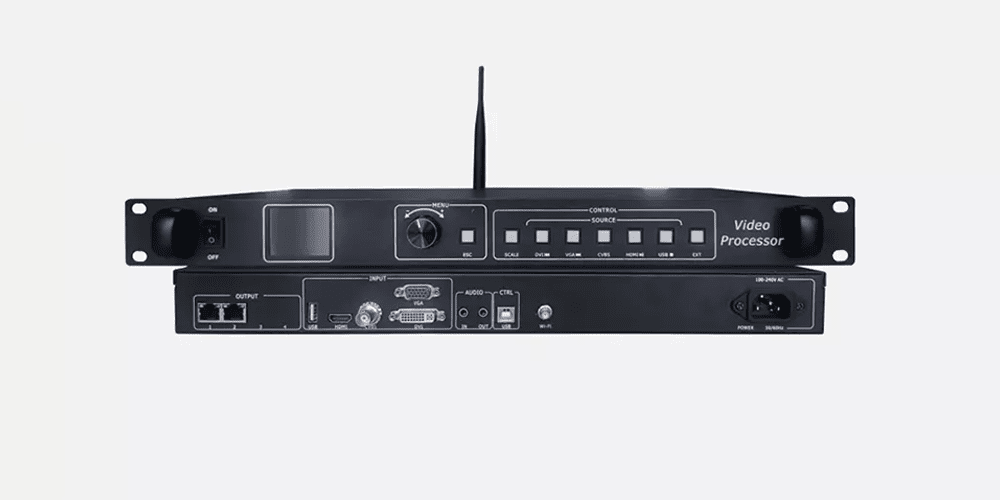
1.1 Appearance
Front panel:
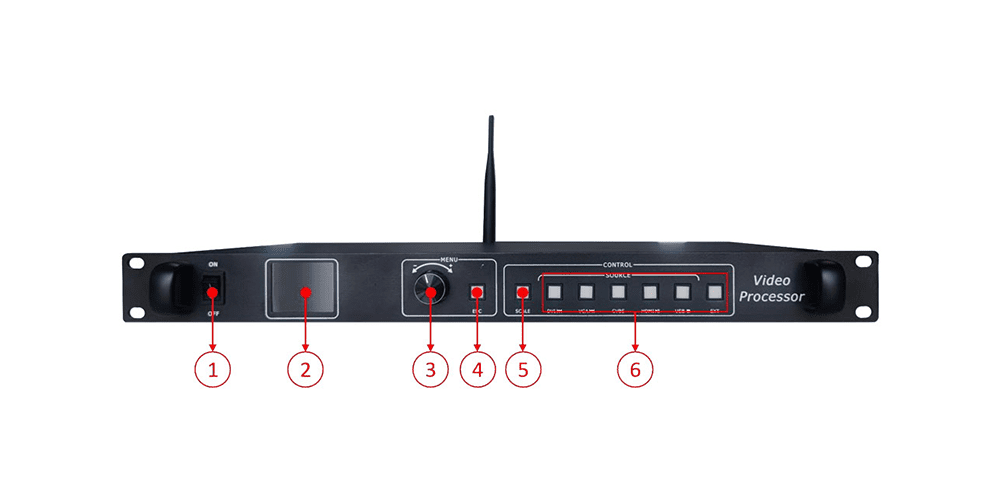
| No. | Button | Function Description |
| 1 | Power button |
Device power switch button |
| 2 | LCD Screen | Display device menu information |
| 3 | Rotary button |
Rotate the knob to select the menu and press to confirm |
| 4 | Return key | Exit the current menu or operation |
| 5 | SCALE | Full-screen zoom shortcut button |
| 6 | Input source | Under U-disk input playback mode, the DVI button will be defined as means to play the previous file. Under U-disk input playback mode, the VGA button will be defined as means to play the next file. Under U-disk input playback mode, CVBS and HDMI buttons will be defined as means to pause or play the file. Under U-disk In input playback mode, the USB button will be defined as ■ means to stop play. |
Rear Panel:
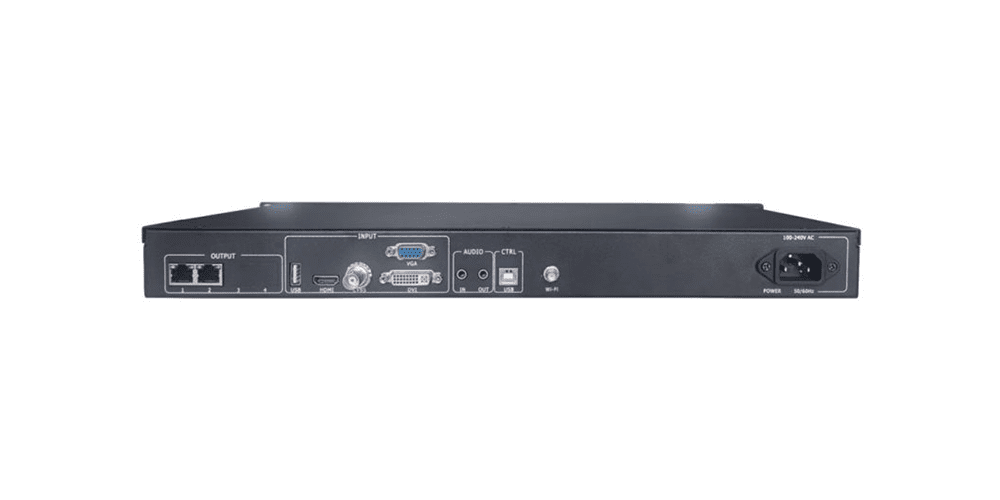
| Rear panel | ||
| Port | Quantity | Function |
| USB(Type A) | 1 | Directly play videos pictures in the USB Image file format:jpg、jpeg、png & bmp; Videofile format:mp4、avi、mpg、mkv、mov、vob & rmvb; Video coding : MPEG4(MP4),MPEG_SD/HD,H.264(AVI,MKV),FLV |
| HDMI | 1 | Signal standard:HDMI1.3 Backward compatible Resolution:VESAStandard,≤1920×1080p@60Hz |
| CVBS | 1 | Signal standard : PAL/NTSC 1Vpp±3db (0.7V Video+0.3v Sync ) 75 ohm Resolution:480i,576i |
| VGA | 1 | Signal standard :R、 G、 B、 Hsync 、 Vsync:0 to1Vpp±3dB (0.7V Video+0.3v Sync ) 75 ohm blacklevel:300mV Sync-tip:0V Resolution:VESAStandard,≤1920×1080p@60Hz |
| DVI | 1 | Signal standard:DVI1.0,HDMI1.3 Backwardcompatible Resolution:VESAStandard,PC to 1920×1080,HD to 1080p |
| AUDIO | 2 | Audio input and output |
| Output Port | ||
| Port | Quantity | Function |
| LAN | 2 | 2-way network port output interface, connected to the acceptance card |
| Control interface | ||
| Port | Quantity | Function |
| Square USB (Type B) | 1 | Connect computer setting screen parameters |
| Power interface | 1 | 110-240VAC,50/60Hz |
2.Key Features of Huidu HD-VP210A
2.1 Input Capabilities
The Huidu HD-VP210A supports a wide range of input signals, making it highly adaptable to different setups:
| Input Type | Description |
| HDMI | Supports resolutions up to 1920×1080@60Hz. |
| DVI | Compatible with PC resolutions up to 1920×1200 and HD resolutions up to 1080p. |
| VGA | Handles VESA standard resolutions up to 1920x1080p@60Hz. |
| CVBS | Supports PAL/NTSC standards with resolutions of 480i and 576i. |
| USB | Plays videos and images directly from a USB drive in formats like MP4, AVI, JPG, and PNG. |
2.2 Output Specifications
On the output side, the HD-VP210A excels with its dual Gigabit Ethernet ports, which can cascade receiving cards for seamless data transmission. Here are the key output details:
| Output Type | Details |
| Network Ports | Two Gigabit Ethernet ports with a combined loading capacity of 1.3 million pixels. |
| Audio Output | TRS 3.5mm dual-channel audio output for external amplification. |
2.3 Functional Highlights
- Wi-Fi Connectivity:Enables wireless operation through a mobile app.
- Brightness Adjustment:Allows users to customize brightness levels for optimal viewing.
- Scenario Presets:Saves up to 8 user-defined templates for quick recall of settings.
- Point-to-Point Scaling:Ensures pixel-perfect clarity without distortion.
3.Detailed Specifications of Huidu HD-VP210A
3.1 Input Interface Details
Below is a breakdown of the input interfaces available on the Huidu HD-VP210A:
| Interface | Quantity | Function |
| USB (Type A) | 1 | Direct playback of videos and images stored on a USB drive. Supported formats include MP4, AVI, MPG, MKV, MOV, VOB, RMVB, JPG, JPEG, PNG, and BMP. |
| HDMI | 1 | HDMI 1.3 backward-compatible input supporting resolutions up to 1920×1080@60Hz. |
| CVBS | 1 | Analog video input supporting PAL/NTSC standards. |
| DVI | 1 | Digital video input compatible with DVI 1.0 and HDMI 1.3 standards. |
| VGA | 1 | Analog RGB input supporting resolutions up to 1920×1080@60Hz. |
| AUDIO IN | 1 | TRS 3.5mm audio input for connecting external audio devices. |
3.2 Output Interface Details
The output interfaces are equally robust, providing flexibility for various display configurations:
| Interface | Quantity | Function |
| LAN Output | 2 | Gigabit Ethernet ports for cascading receiving cards and transmitting RGB data streams. Each port supports a loading capacity of 655,360 pixels. |
| AUDIO OUT | 1 | TRS 3.5mm dual-channel audio output for connecting external amplifiers. |
4.Huidu HD-VP210A Controller Resources Download
To obtain all the necessary resources for the Huidu HD-VP210A controller, including firmware, user manuals, and operating guides, we recommend visiting the Huidu software download page.
This platform provides comprehensive Huidu resources. From the HDPlayer software to detailed user guides, you will find all the tools you need for smooth operation.
5.Setup and Operation Guide
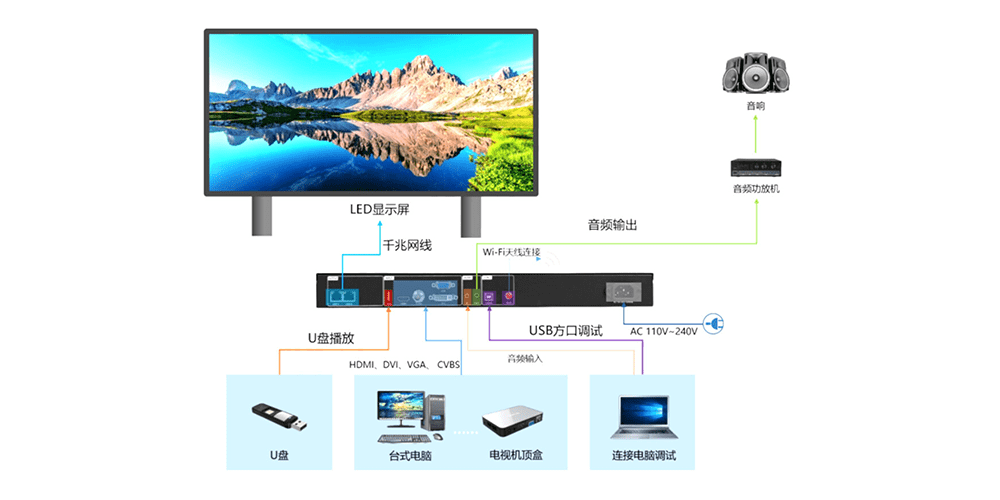
5.1 Step-by-Step Setup
1)Connect Power: Plug the device into an AC power source (100-240V).
2)Connect Inputs: Attach your desired input sources (HDMI, DVI, VGA, CVBS, or USB).
3)Configure Outputs: Connect the Gigabit Ethernet ports to receiving cards or other compatible devices.
4)Adjust Settings: Use the LCD screen and rotary knob to configure resolution, brightness, and other parameters.
5.2 Input Source Switching
Switching between input sources is straightforward:
- Press the corresponding button (HDMI, DVI, VGA, etc.) on the front panel.
- Alternatively, navigate to the “Input Settings” menu via the LCD screen.
5.3 Zoom and Scaling
The Huidu HD-VP210A supports two zoom modes:
- Full-screen zoom: Automatically scales the input resolution to fit the display.
- Point-to-point scaling: Displays the image without scaling, allowing precise adjustments to horizontal and vertical offsets.
5.4 USB Playback
To play media files from a USB drive:
(1)Insert the USB drive into the designated port.
(2)Navigate to the “U-disk settings” menu.
(3)Select the desired media type (video or image) and browse the playlist.
(4)Choose playback mode (single loop or list loop).
6.Applications of HD-VP210A
The versatility of the Huidu HD-VP210A makes it suitable for a wide range of applications:
Hotels: Enhance guest experiences with dynamic digital signage.
Shopping Malls: Display advertisements and promotions on large LED screens.
Conference Rooms: Facilitate presentations and video conferencing.
Exhibitions: Create immersive visual displays for trade shows and events.
Studios: Achieve precise color calibration for professional video production.
7.Pricing and Value Proposition
While the exact price of the Huidu HD-VP210A may vary depending on the supplier, it is competitively priced within its category. Considering its advanced features, robust build quality, and extensive connectivity options, the HD-VP210A offers excellent value for money.
For the latest pricing information, visit the official website at ledcontrollercard.com or contact authorized distributors.
8.FAQs
What are the main features of the HD-VP210A?
The HD-VP210A supports multiple input sources (HDMI, DVI, VGA, CVBS), dual Gigabit Ethernet outputs, Wi-Fi connectivity, and U-disk playback.
What is the maximum control range of the HD-VP210A?
The HD-VP210A supports a maximum loading capacity of 1.3 million pixels, with a maximum width of 3840 pixels and height of 2500 pixels.
How do I publish programs to the HD-VP210A?
You can update programs via USB drive or configure settings directly using the front panel interface.
What kind of storage does the HD-VP210A support?
The device has an internal memory system and supports USB drives formatted in FAT or FAT32.
What are the supported connection types for the HD-VP210A?
The HD-VP210A supports LAN, Wi-Fi, and optional 4G connectivity for versatile internet management.
9.Conclusion
In conclusion, the Huidu HD-VP210A is a feature-rich video processor that delivers exceptional performance and flexibility. Its ability to handle multiple input sources, support high-definition playback, and integrate seamlessly with LED displays makes it a standout choice for professionals in various industries. If you’re looking for a reliable and cost-effective solution for your video processing needs, the HD-VP210A is worth considering.
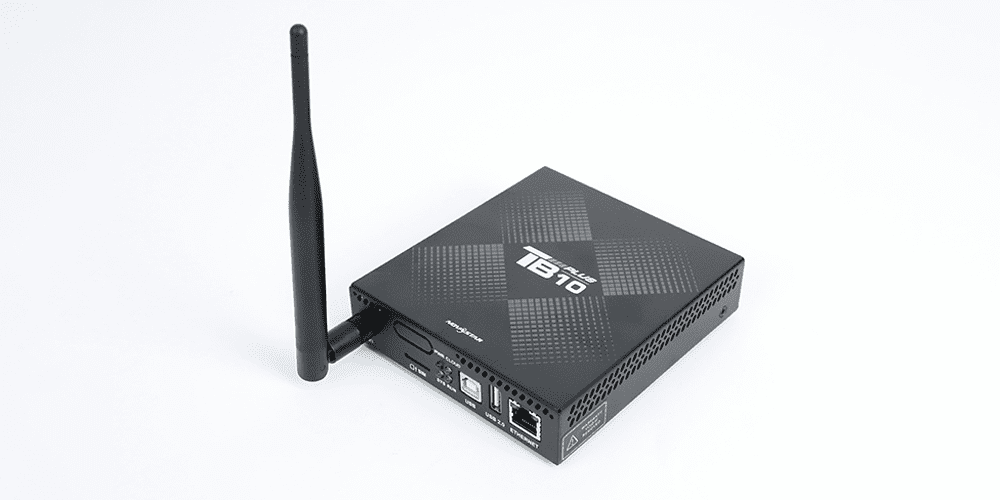 Novastar TB10 Plus: A new generation LED display multimedia player
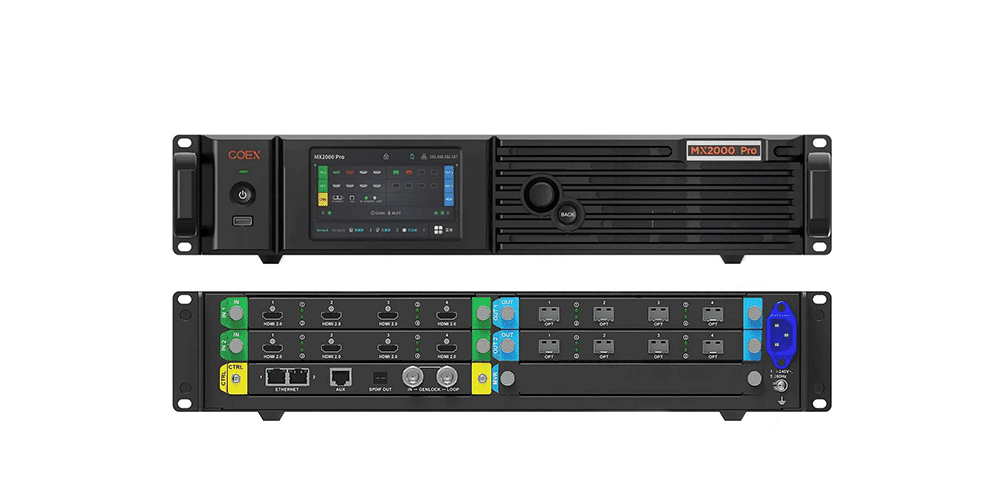 NovaStar MX2000 Pro LED display controller:Specs, Price and Download