

NovaStar TU40 Pro Specifications: Everything You Need to Know
2026-02-26T03:52:39+00:00February 26, 2026|Tags: FAQs NovaStar|
Colorlight X8m Ultra-4K LED Video Processor Review: Performance, Features & Advantages
2026-02-02T03:18:55+00:00February 13, 2026|Tags: FAQs Colorlight|
HUIDU HD-VP620 LED Display All-In-One Video Processor
2026-02-02T03:02:40+00:00February 2, 2026|Tags: FAQs HuiDu|
In the world of advanced display technologies, the HUIDU HD-VP620 stands out as a versatile and powerful 2-in-1 video processor. Designed to meet the demands of modern multimedia environments, this device combines traditional video processing capabilities with cutting-edge features like Wi-Fi connectivity, dual-window functionality, and support for 4K@60Hz signal input. Whether you’re managing displays in hotels, shopping malls, conference rooms, or studios, the HD-VP620 offers unmatched flexibility and performance.
Let’s dive into its key features, technical specifications, and how it can elevate your display projects.
Table of Content
1.Key Features of the HUIDU HD-VP620
1.1 Input and Output Versatility
The HUIDU HD-VP620 is equipped with an impressive array of input and output options. On the input side, it supports five types of signal interfaces: HDMI, DVI, DP (DisplayPort), VGA, and EXT (which defaults to DVI but can be customized to SDI). This versatility ensures compatibility with virtually any source device, including those transmitting ultra-high-definition 4K signals.
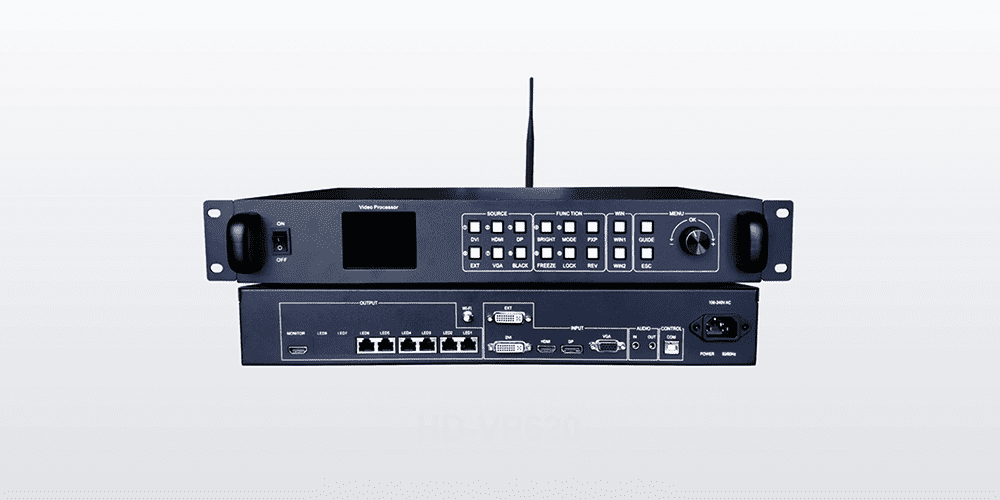
For audio enthusiasts, the device includes a TRS 3.5mm audio input alongside HDMI audio support. On the output side, the HD-VP620 boasts six Gigabit Ethernet ports designed for direct cascading to receiving cards. With a maximum loading capacity of 3.9 million pixels, a width of up to 8000 pixels, and a height of 4000 pixels, this processor is ideal for large-scale LED displays. Additionally, a TRS 3.5mm audio output ensures seamless integration with external amplifiers for high-quality sound.
1.2 Advanced Functionalities
One standout feature of the HUIDU HD-VP620 is its built-in Wi-Fi capability, which allows users to control the device wirelessly via a mobile app. This eliminates the need for cumbersome cables and makes real-time adjustments effortless. Other notable functionalities include:
- Brightness Adjustment:Fine-tune screen brightness to suit ambient lighting conditions.
- Key Lock Function:Prevent accidental button presses during critical presentations.
- Preset Templates:Save up to eight user-defined templates for quick recall of frequently used settings.
- Dual-WindowDisplay:Supports Picture-in-Picture (PIP) and Picture-on-Picture (POP) modes, enabling simultaneous viewing of multiple sources.
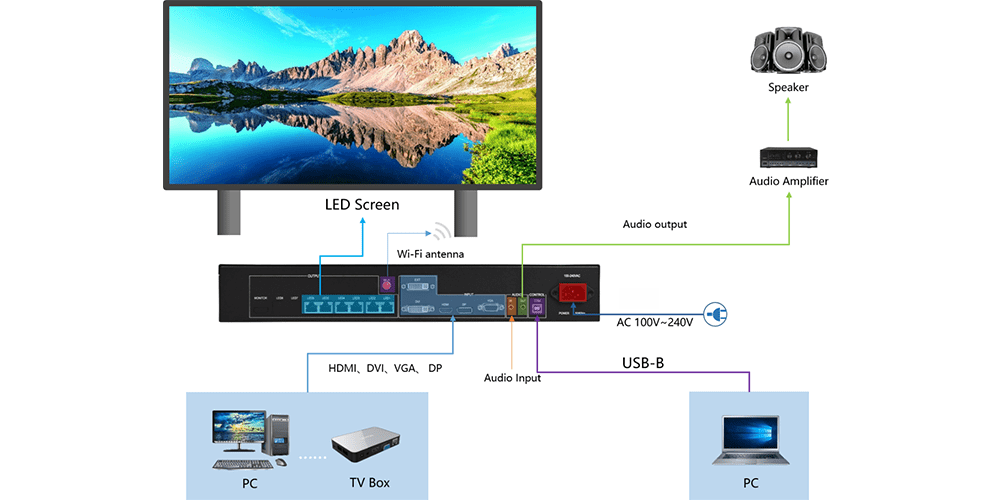
These features make the HD-VP620 not just a processor but a comprehensive solution for dynamic visual presentations.
2.Technical Specifications of the HUIDU HD-VP620
To fully appreciate the capabilities of the HUIDU HD-VP620, let’s delve into its detailed technical specifications.
| Category | Details |
| Input Interfaces | HDMI, DVI, DP, VGA, EXT (DVI/SDI) |
| Output Interfaces | 6 x Gigabit Ethernet Ports |
| Audio Input/Output | TRS 3.5mm Audio Input; TRS 3.5mm Dual Channel Audio Output |
| Maximum Loading | 3.9 Million Pixels |
| Resolution Support | Up to 4K@60Hz |
| Power Supply | AC 100-240V, 50/60Hz |
| Operating Temperature | -20°C to 55°C |
| Humidity Range | 20%RH to 90%RH (Operating); 10%RH to 95%RH (Storage) |
With these robust specifications, the HD-VP620 ensures reliable performance across diverse environments and use cases.
3.Front Panel Design and Controls
The front panel of the HUIDU HD-VP620 is thoughtfully designed for ease of operation. Here are some highlights:
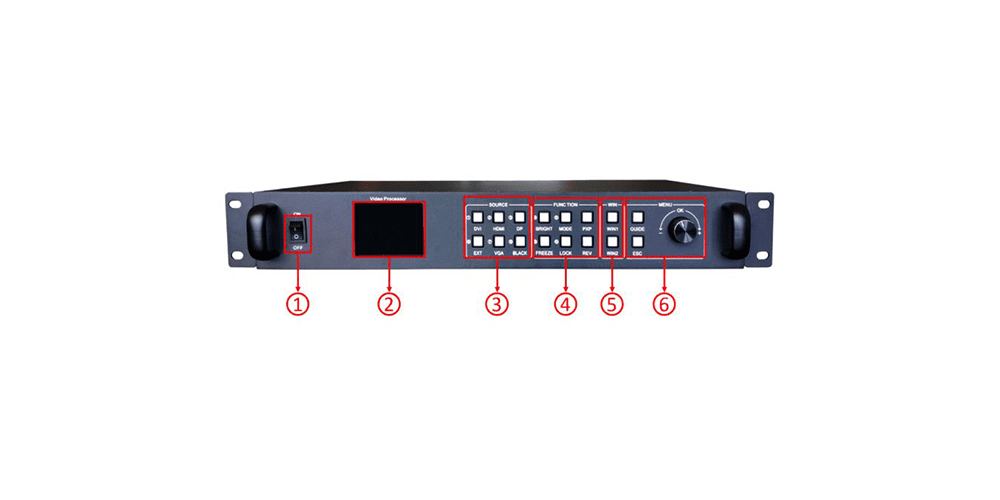
- Power Switch:A simple toggle controls the AC power input.
- LCD Screen: Displays essential information such as menu options, screen parameters, and debugging details.
- SOURCE Buttons: Five buttons correspond to the rear-panel input ports, allowing quick switching between sources.
- Function Keys:These multipurpose keys enable rapid access to brightness adjustment, preset mode calling, dual-picture layout, screen freeze, and key lock functions.
- Window Selection: Two dedicated WIN buttons allow users to manage up to two windows simultaneously.
- Menu Navigation Knob:This intuitive dial facilitates scrolling through menus, confirming selections, and accessing smart navigation shortcuts.
Such a well-organized interface ensures that even non-technical users can operate the HD-VP620 with confidence.
4.Rear Panel Connections
On the rear panel, the HUIDU HD-VP620 provides an extensive range of connection options:
- Input Ports:HDMI, DVI, DP, VGA, and EXT (configurable as DVI or SDI).
- Output Ports:Six Gigabit Ethernet ports for cascading to LED receiving cards.
- Audio Ports: Separate TRS 3.5mm jacks for audio input and output.
- Control Interface:Includes a USB-B port for PC connectivity and firmware updates, as well as a Wi-Fi antenna port for enhanced wireless signal strength.
- Power Port:Accepts AC power within the range of 100-240V at 50/60Hz.
This comprehensive array of connections ensures seamless integration into existing systems while offering future-proof expandability.
5.Practical Applications of the HUIDU HD-VP620
5.1 Hotels and Shopping Malls
In hospitality and retail settings, captivating visuals are crucial for engaging audiences. The HUIDU HD-VP620 excels in these environments by delivering vibrant, high-resolution content. Its ability to handle multiple inputs means you can seamlessly switch between promotional videos, live feeds, and static advertisements without missing a beat.
5.2 Conference Rooms and Studios
For professional environments like conference rooms and broadcast studios, precision and reliability are paramount. The HD-VP620’s support for 4K@60Hz ensures crystal-clear presentations, while its dual-window functionality allows presenters to display slideshows alongside webcam footage or other supplementary materials.
5.3 Exhibitions and Events
At exhibitions and events, where adaptability is key, the HD-VP620 shines. Its Wi-Fi capability enables remote management, making it easy to update content on the fly. Meanwhile, its robust build quality ensures consistent performance even under challenging conditions.
6.Step-by-Step Setup Guide for the HUIDU HD-VP620
Setting up the HUIDU HD-VP620 is straightforward thanks to its intuitive design and accompanying software tools. Follow these steps to get started:
1.Connect Hardware: Use a USB-B cable to link the HD-VP620 to your computer.
2.Install HDSet Software: Download the latest version from www.huidu.cn and follow the installation prompts.
3.Configure Screen Parameters: Launch HDSet, select your device, and navigate to the “Screen Configuration” tab to adjust resolution, refresh rate, and network port settings.
4.Test Inputs and Outputs: Verify that all connected devices are functioning correctly by cycling through available input sources.
5.Save Presets: Customize and save up to eight templates for recurring setups.
By following these steps, you’ll have your HD-VP620 up and running in no time.
7.Why Choose the HUIDU HD-VP620?
When selecting a video processor, several factors come into play: performance, flexibility, ease of use, and value for money. The HUIDU HD-VP620 ticks all these boxes and more. Its ability to process 4K signals, support dual-window displays, and integrate Wi-Fi functionality sets it apart from competitors. Moreover, its rugged construction and wide operating temperature range ensure longevity and reliability.
8.Conclusion
The HUIDU HD-VP620 represents the pinnacle of modern LED display technology. With its rich feature set, robust build quality, and user-friendly design, it caters to a broad spectrum of applications—from commercial venues to professional studios. Whether you’re looking to enhance customer engagement, streamline business operations, or create immersive event experiences, the HD-VP620 is your ultimate ally.
Investing in the HUIDU HD-VP620 isn’t just about acquiring a piece of hardware—it’s about unlocking endless possibilities for creativity and innovation. So why wait? Explore the potential of this remarkable device today and take your display projects to new heights!
 NovaStar H15 LED Video Controller for High-End Display Projects
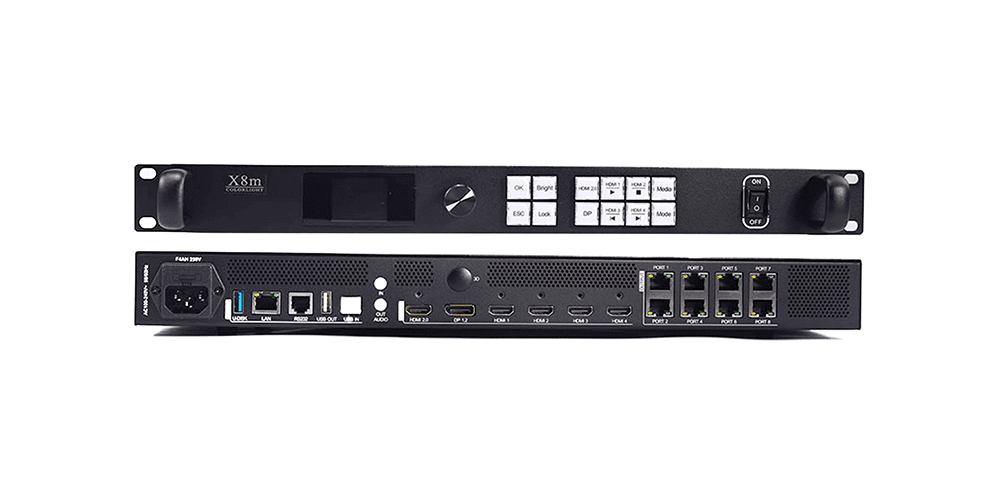 Colorlight X8m Ultra-4K LED Video Processor Review: Performance, Features & Advantages