

NovaStar TU40 Pro Specifications: Everything You Need to Know
2026-02-26T03:52:39+00:00February 26, 2026|Tags: FAQs NovaStar|
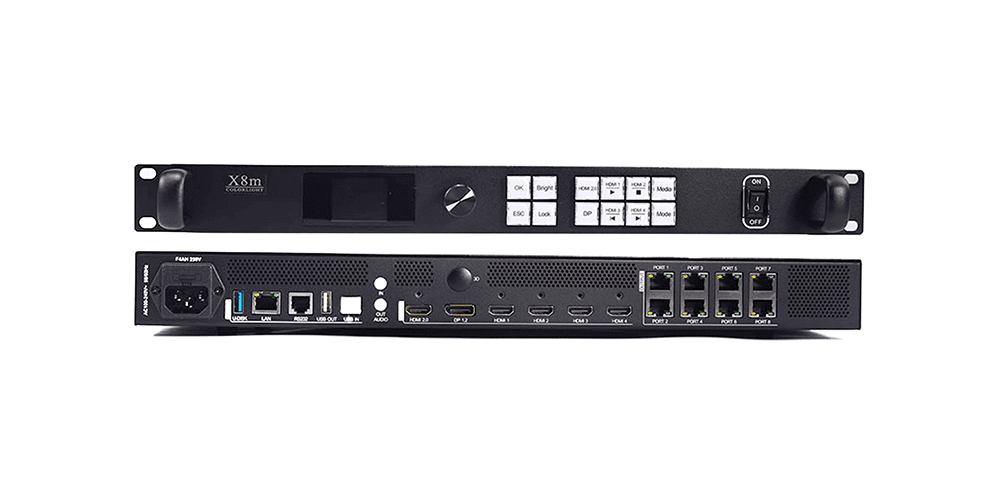
Colorlight X8m Ultra-4K LED Video Processor Review: Performance, Features & Advantages
2026-02-02T03:18:55+00:00February 13, 2026|Tags: FAQs Colorlight|
HUIDU HD-VP620 LED Display All-In-One Video Processor
2026-02-02T03:02:40+00:00February 2, 2026|Tags: FAQs HuiDu|
The NovaStar TU40 Pro is a revolutionary LED playback control processor designed by Xi’an NovaStar Tech Co., Ltd. This cutting-edge device integrates an Android-based system, sending card, and advanced video processing capabilities into one compact unit. With its robust interaction, display, and playback control features, the TU40 Pro redefines how LED screens are managed and utilized. Supporting a maximum load capacity of 13 million pixels, it delivers unparalleled visual performance for various applications, from corporate showrooms to outdoor standalone displays.
In this article, we’ll delve into the specifications, features, and functionalities of the NovaStar TU40 Pro, exploring how it can elevate your LED screen experience. Let’s get started.
Table of Content
1.NovaStar TU40 Pro Introduction
1.1 Appearance
1.1.1 Front Panel
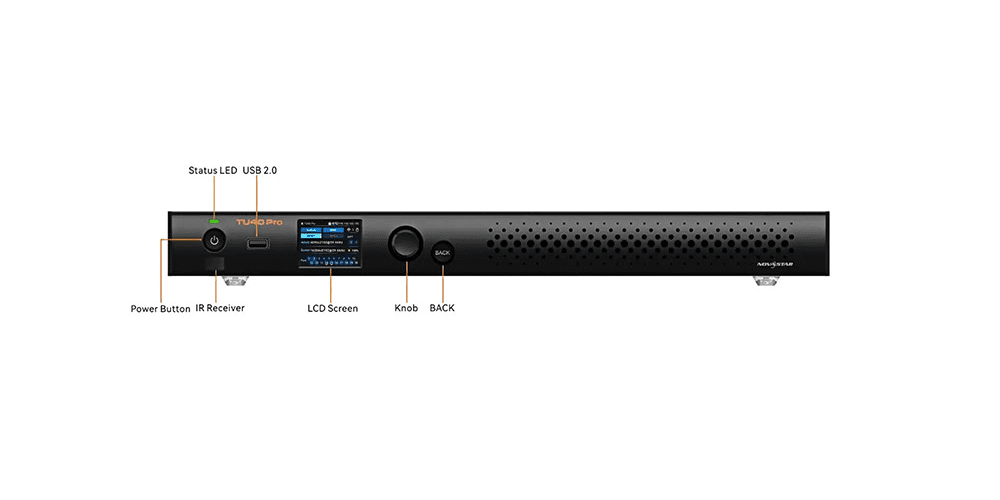
The front panel of the NovaStar TU40 Pro includes:
- USB 2.0:For connecting peripherals like a mouse, keyboard, or camera.
- Status LED: Indicates power status (solid red for off, solid green for normal/standby).
- Standby Button: Powers on/off or restarts the device.
- LCD Screen:A 2.0-inch display showing device status, menus, and messages.
- Knob and BACK Button: For navigation and operation.
1.1.2 Rear Panel
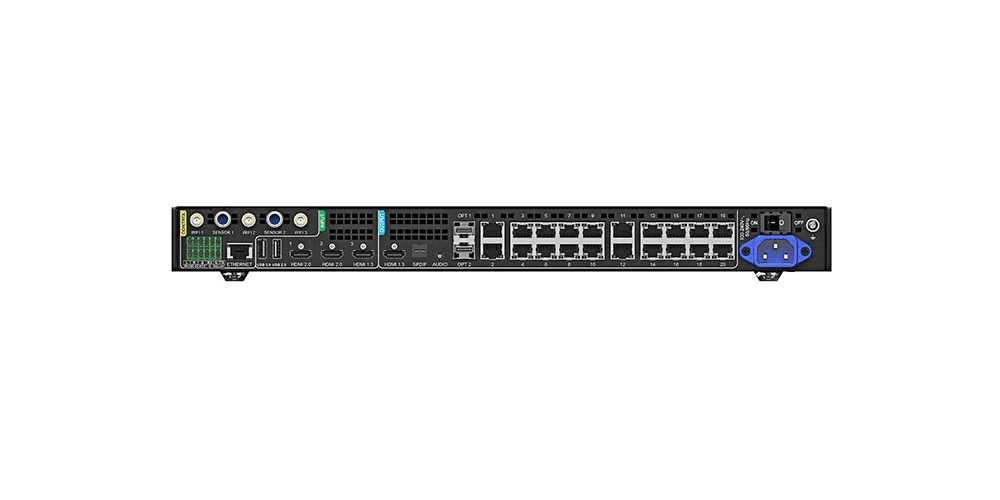
The rear panel houses multiple inputs and outputs:
- HDMI Inputs: 1x HDMI 1.3 and 2x HDMI 2.0 for high-resolution video transmission.
- USB Ports: 2x USB 2.0 and 1x USB 3.0 for versatile connectivity.
- Ethernet Outputs:20x Gigabit Ethernet ports for high-speed data transfer.
- Audio Outputs: Includes SPDIF, 3.5mm, HDMI eARC, and Phoenix connectors.
1.2 Specifications
| Category | Details |
| Input Voltage | 100-240V~, 50/60Hz, 2.5A Max |
| Rated Power Consumption | 53.9 W |
| RAM | 8 GB |
| Internal Storage | 128 GB |
| Operating Temperature | -20°C to +50°C |
| Humidity | 5% RH to 85% RH, non-condensing |
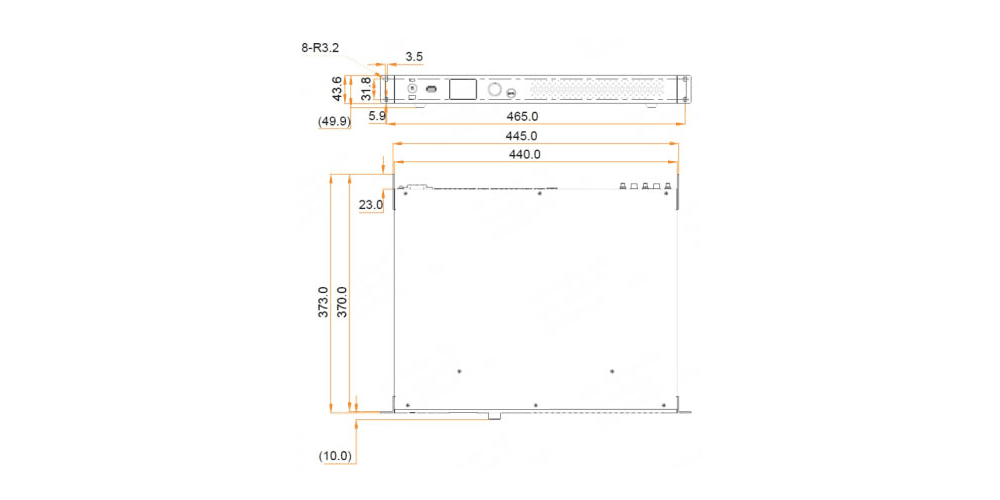
| Dimensions | 445.0 mm × 383.0 mm × 49.9 mm |
| Net Weight | 4.54 Kg |
1.3 Dimensions
2.NovaStar TU40 Pro Inputs and Outputs
2.1 HDMI and USB Inputs
The NovaStar TU40 Pro boasts an impressive array of inputs and outputs, making it a versatile choice for any LED setup:
HDMI Inputs:
- 1x HDMI 1.3 input (up to 1920×1080@60Hz)
- 2x HDMI 2.0 inputs (up to 3840×2160@60Hz)
These inputs provide high-quality video transmission, ensuring smooth handling of diverse content sources.
USB Inputs:
- 2x USB 2.0 inputs
- 1x USB 3.0 input
The USB ports allow connection to peripherals like mice, keyboards, cameras, and speakers. They also support USB playback, firmware updates, and log exporting.
2.2 Ethernet and OPT Outputs
- Ethernet Outputs:20x Gigabit Ethernet outputs ensure high-speed data transmission, ideal for complex visual presentations.
- OPT Outputs:2x optical outputs for fiber conversion, perfect for long-distance signal transmission.
2.3 Audio Outputs
The TU40 Pro offers multiple audio output options:
- 1x SPDIF digital audio output
- 1x 3.5mm audio output
- 1x HDMI eARC audio output
- 1x Phoenix audio output
These options ensure flexibility in managing both analog and digital audio signals.
2.4 Output Image Scaling
With a width range of 64 to 16,384 pixels and a height range of 64 to 8,192 pixels, the TU40 Pro supports extensive image scaling. Its total load capacity of up to 13 million pixels ensures optimal performance for any screen size or resolution.
3.NovaStar TU40 Pro Device Controls: Seamless Management
3.1 Gigabit Ethernet Control
Equipped with a Gigabit Ethernet port supporting TCP/IP protocol, the NovaStar TU40 Pro enables seamless network communication. This feature allows remote access and control through standard network infrastructure.
3.2 Energy-Efficient Standby Mode
The device features a low-power mode, consuming less than 0.5W during standby. You can wake it up via an infrared remote, providing both energy savings and convenience.
3.3 Mobile App Control (VNNOX Care)
The VNNOX Care mobile app adds intelligence to LED screen control. Available for smartphones, this app lets users configure their LED screens within just 10 minutes. It also supports QR code scanning for quick setups, topology adjustments via photos, and real-time device status monitoring.
3.4 Bluetooth 5.1
The built-in Bluetooth 5.1 module connects seamlessly to peripherals such as Bluetooth voice remotes, mice, keyboards, and sound systems. This enhances the TU40 Pro’s versatility in terms of input and interaction.
4. NovaStar TU40 Pro Functions
4.1 Android 13.0 Desktop System
Operating on Android 13.0, the NovaStar TU40 Pro supports third-party apps, enabling added functionality. Its powerful quad-core A73 + quad-core A53 ARM processor @ 2.2 GHz ensures smooth 4K video decoding at 60Hz.
4.2 Wireless Screen Mirroring
The TU40 Pro supports wireless screen mirroring from Windows, macOS, iOS, and Android devices, with a maximum resolution of 3840×2160@30Hz. This feature makes presentations and collaborations seamless.
4.3 AI Image Enhancement
AI image enhancement intelligently recognizes playing content, fine-tunes colors, and optimizes color saturation, brightness, sharpness, and motion compensation for superior visuals.
4.4 Dynamic Engine
The Dynamic Engine performs real-time analysis and dynamic adjustment for each frame, significantly improving display contrast and image details while reducing power consumption. This extends the service life of the LED screen.
5.Applications of NovaStar TU40 Pro
The versatility of the NovaStar TU40 Pro makes it ideal for various scenarios:
- Corporate Showrooms:Simplifies asynchronous program playback and content management.
- Conference Rooms: Transforms any LED screen into a collaborative meeting tool.
- Outdoor Displays: Supports standalone LED screens with minimal setup requirements.
Note: The NovaStar TU40 Pro is best suited for fixed installations and asynchronous use, offering cost-effective alternatives to the VX series but with fewer interfaces and limited button operations.
6.Operation Guide for NovaStar TU40 Pro
6.1 Menu Introduction
Navigating the NovaStar TU40 Pro is intuitive, thanks to its user-friendly menu system displayed on the front LCD panel.
6.1.1 Instructions
1.Upon startup, rotate the knob to select a language (Simplified Chinese or English) and confirm by pressing the knob.
2.Connect to the device’s hotspot and confirm the connection.
6.1.2 Home Screen
The home screen provides real-time information about the device’s status, signal sources, and network connections.
6.1.3 Main Menu
Access the main menu by pressing the knob. From here, you can adjust brightness, volume, effects, and network settings.
6.2 Getting Started
6.2.1 Hardware Setup
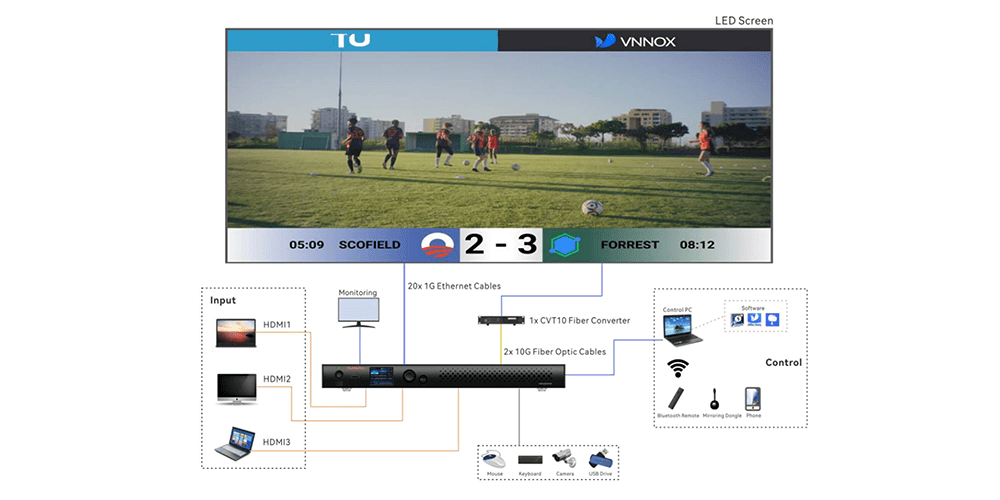
1.Unpack the device and gather accessories like Ethernet cables, remote control, and mirroring dongle.
2.Connect peripherals such as a mouse, keyboard, or camera as needed.
3.Link the LED screen to the TU40 Pro using Ethernet cables.
6.2.2 Installing Necessary Applications
Download ViPlex Handy and VNNOX Care from the app store for streamlined program editing, publishing, and screen configuration.
6.2.3 Configuring the LED Screen
Use VNNOX Care’s Quick Start feature to configure the screen efficiently.
6.2.4 System Initialization
1.Select your preferred language.
2.Pair the remote via Bluetooth.
3.Agree to the service agreement and set up Wi-Fi.
6.2.5 Usage of the Remote
The remote control simplifies device operation, allowing users to navigate menus, adjust settings, and manage playback effortlessly.
7.FAQs about NovaStar TU40 Pro
Q:What is the primary function of the NovaStar TU40 Pro?
The NovaStar TU40 Pro is an all-in-one LED playback control processor designed for seamless screen management and content delivery.
Q:What is the maximum pixel load capacity?
It supports up to 13 million pixels, ensuring compatibility with large, high-resolution LED displays.
Q:Does it support wireless screen mirroring?
Yes, it supports wireless mirroring from Windows, macOS, iOS, and Android devices at resolutions up to 3840×2160@30Hz.
Q:How can I control the TU40 Pro remotely?
You can use the front panel LCD, infrared remote, Bluetooth-enabled peripherals, or mobile apps like ViPlex Handy and VNNOX Care.
8.Conclusion
The NovaStar TU40 Pro is a game-changer in the world of LED display technology. Its powerful processing capabilities, versatile connectivity options, and user-friendly interface make it an indispensable tool for businesses, conference rooms, and outdoor displays. Whether you’re looking to streamline content management or enhance visual experiences, the TU40 Pro delivers unmatched performance and reliability. Explore its features today and take your LED applications to new heights!
For more resources, including user manuals and software downloads, visit the official NovaStar Software download page.
 Colorlight X8m Ultra-4K LED Video Processor Review: Performance, Features & Advantages