

NovaStar TU40 Pro Specifications: Everything You Need to Know
2026-02-26T03:52:39+00:00February 26, 2026|Tags: FAQs NovaStar|
Colorlight X8m Ultra-4K LED Video Processor Review: Performance, Features & Advantages
2026-02-02T03:18:55+00:00February 13, 2026|Tags: FAQs Colorlight|
HUIDU HD-VP620 LED Display All-In-One Video Processor
2026-02-02T03:02:40+00:00February 2, 2026|Tags: FAQs HuiDu|
In the professional LED display field, Novastar VX400 Pro stands out as an all-in-one controller that combines video processing and transmission functions. It is specifically designed for high-end commercial displays, stage performances, and large-scale conferences.
This guide will delve deeply into the core features, applicable scenarios, and operation skills of this device, helping you fully understand and efficiently use the Novastar VX400 Pro, providing strong support for your LED display projects.
Table of Content
1.What Is the Novastar VX400 Pro?
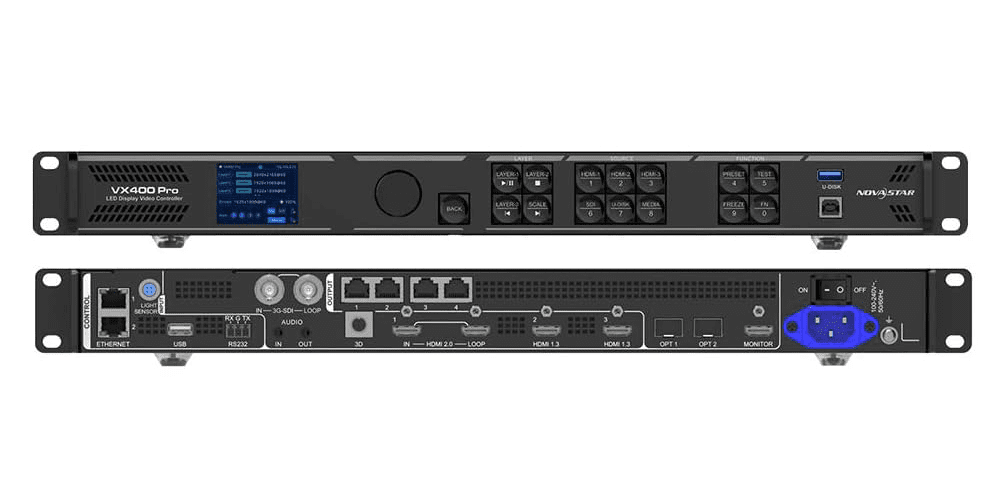
The Novastar VX400 Pro is an integrated LED display controller that merges video processing and transmission capabilities. It supports multiple video signal inputs such as HDMI 2.0, DP 1.2, and DVI, with a maximum input resolution of up to 4K×2K@60Hz, ensuring high-quality and compatible picture signals.
This controller can manage a display area of up to 2.6 million pixels, supporting an output width of 10,240 pixels and a height of 8,192 pixels. It is particularly suitable for precise control of ultra-wide or ultra-high LED large screens. Whether it’s for rental performances, exhibitions, or fixed installation projects, the Novastar VX400 Pro offers efficient and professional solutions for LED video wall systems with its stability and flexibility.
2.Key Features of the Novastar VX400 Pro
2.1 Integrated Design Simplifies Deployment
The VX400 Pro integrates video processing and transmission functions into a single device, eliminating the need for multiple additional controllers and greatly simplifying the deployment process of LED display systems.
2.2 Support for Multiple Signal Inputs
Supports multiple high-definition video input interfaces such as HDMI 2.0, DP 1.2, and DVI, with a maximum input resolution of up to 4K×2K@60Hz, ensuring high quality and compatibility of picture signals.
2.3 Powerful Pixel Loading Capability
It supports a maximum display of 2.6 million pixels, with a maximum width of 10,240 pixels and a maximum height of 8,192 pixels. It is particularly suitable for controlling large LED screens or special aspect ratio images.
2.4 Flexible Multi-layer Image Processing
Offers up to 6 layer configurations, supporting free zooming, position adjustment, and layer priority setting, meeting the actual needs of complex picture layout and multi-content playback.
2.5 Low Latency and High Stability
Equipped with low-latency image transmission technology, it ensures synchronous and stable transmission of image signals in real-time scenarios such as performances and conferences, enhancing the audience experience.
2.6 Pixel-level Brightness and Color Correction
Supports point-by-point brightness and chroma correction functions, making the entire screen picture more uniform and the color performance more realistic. It is suitable for high-end projects with extremely high requirements for picture quality.
2.7 Multi-mode Control and Convenient Operation
Can be remotely configured and controlled through the front panel knob, NovaLCT professional software, Unico web version, and VICP mobile app, meeting the convenient operation requirements of multiple scenarios.
2.8 Sturdy and Durable Industrial-grade Structure
Adopts a durable metal casing, featuring excellent anti-interference and heat dissipation performance, and can operate stably in complex application environments such as performances, exhibitions, and monitoring centers.
3.Working Modes & Applications
3.1 Working Modes
As an integrated video controller, Novastar VX400 Pro features multiple professional working modes and can be flexibly configured according to on-site requirements. It mainly includes two core modes: Device Working Mode and OPT Mode (fiber optic mode), jointly building up the outstanding functional system of this controller.
3.2 Video Device Working Mode
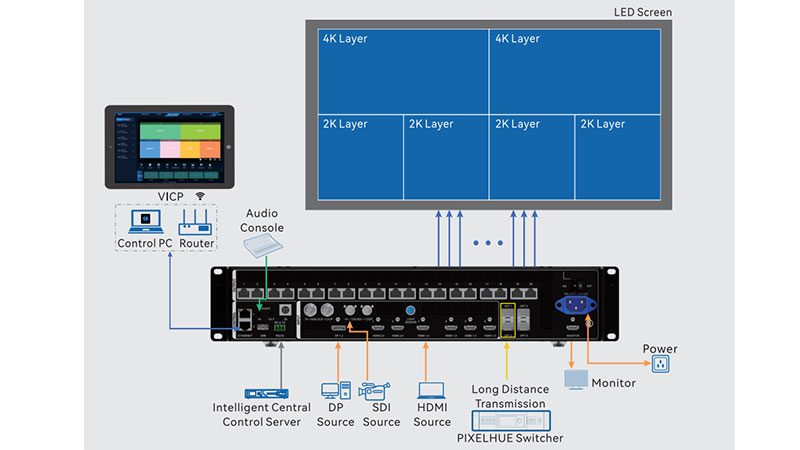
- Video Controller Mode: This is the most commonly used controller mode. The device integrates functions such as video signal input, image processing, layering, zooming, and output control. It can complete all processes with one machine and is suitable for various scenarios including performance stages, advertising screens, and meeting rooms.
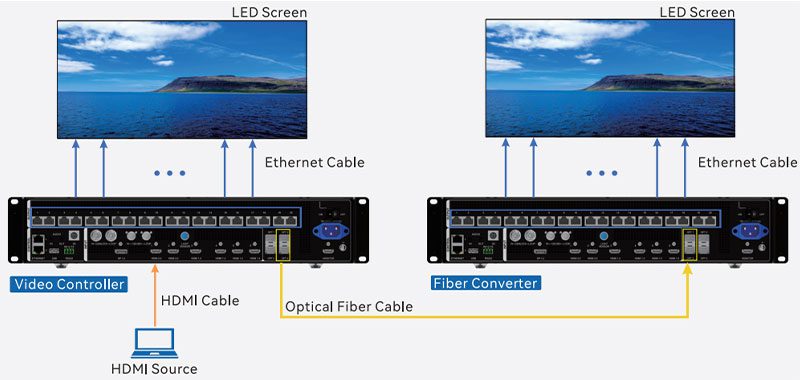
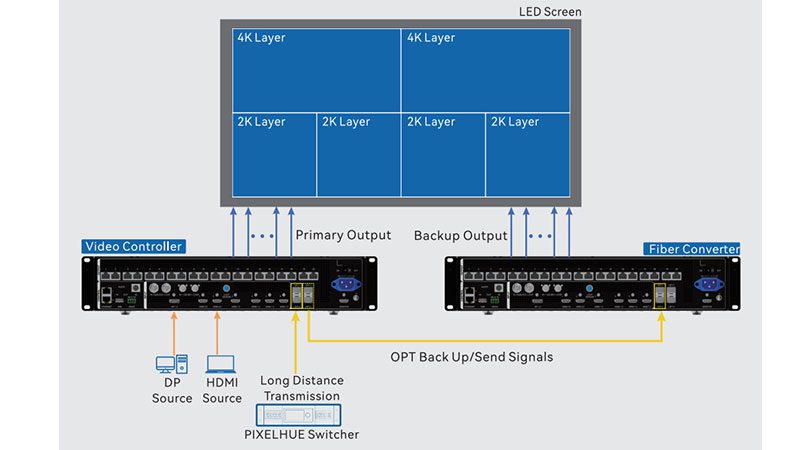
- Fiber Converter Mode:This mode uses the device as a fiber optic signal relay, converting electrical signals into optical signals for long-distance transmission, maintaining high stability and high-definition picture quality, and is suitable for large venues or outdoor projects.
- Bypass Mode:In this mode, video signals can be directly output without processing, providing a convenient solution for system debugging and signal backup, ensuring that the system has stable emergency response capabilities at critical moments.
3.3 OPT Mode
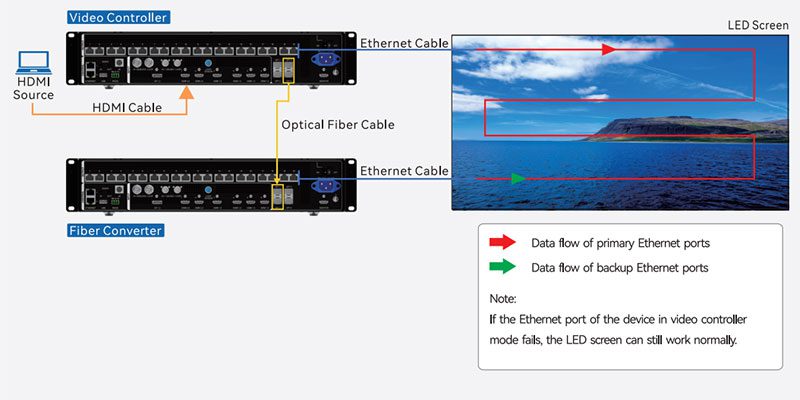
The Novastar VX400 Pro supports high-performance optical fiber transmission and offers two working modes: Copy mode and Backup mode, to meet different application requirements.
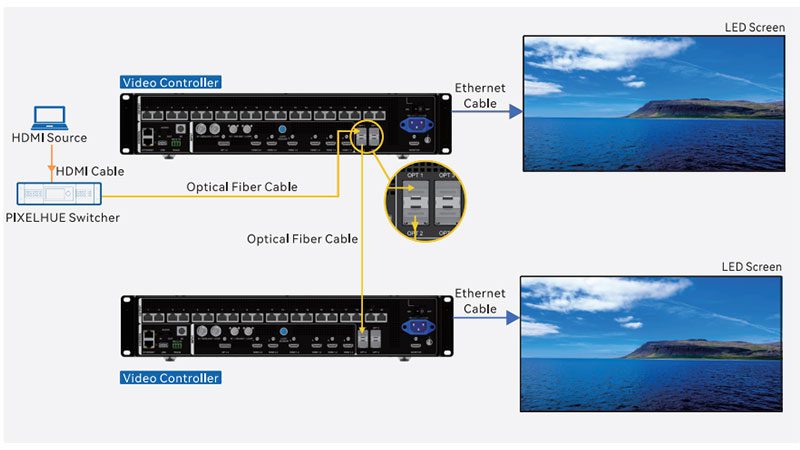
- Copy Mode:Copies all the signals output by the main unit one-to-one to the backup unit to achieve synchronous playback of the same content on multiple screens, which is suitable for scenarios such as large-screen splicing or synchronous display of extended screens.
- Backup Mode:When the main unit malfunctions, the backup unit automatically takes over the signal output to ensure that the picture is not interrupted. It is widely used in high-stability places such as stage performances and control centers.
3.4 Applications
- As a video controller:It can handle multiple high-definition video signals, making it suitable for stage performances, exhibitions, and commercial large screens, ensuring clear and smooth images.
- As an optical fiber converter:Achieves long-distance signal transmission through optical fibers and is suitable for large venues and outdoor advertising, ensuring stable and lossless signals.
4.Novastar VX400 Pro Price
The price of Novastar VX400 Pro typically ranges between $950 and $1,200. The specific price may vary depending on the region, supplier, and purchase quantity. Some sales channels may also offer corresponding technical support or warranty services, and prices will be adjusted accordingly. For users with limited budgets, they can pay attention to promotional activities or bulk purchase discounts to obtain more competitive prices.
Overall, as a high-performance LED display controller, the VX400 Pro has a reasonable price positioning and is suitable for the demands of the mid-to-high-end market.
5.Comparison With Novastar VX400 Pro and Novastar VX600 Pro
The main differences between the Novastar VX400 Pro and VX600 Pro lie in their performance and application scenarios. The VX600 Pro features stronger loading capabilities and higher resolution support, making it suitable for scenarios with extremely high requirements for picture quality, such as large stages and ultra-high-definition displays.
The VX400 Pro, on the other hand, places more emphasis on flexibility and cost-effectiveness, making it suitable for medium-sized rental performances or fixed installation projects.
If you are hesitant when making a choice, you may refer to the comparison table below to help you quickly find a more suitable solution.
| Device Model | VX400 Pro | VX600 Pro |
|---|---|---|
| Loading Capacity | 2.6 million pixels | 3.9 million pixels |
| Max Width (pixels) | 10240 | 10240 |
| Max Height (pixels) | 8192 | 8192 |
| Layers | 6 *2K×1K | 6 *2K×1K |
| Input Connectors | 1× HDMI 2.0(IN&LOOP) 2× HDMI 1.3 1× 3G-SDI(IN&LOOP) 1× 10G OPT Port(OPT1) 1× USB3.0 |
1× HDMI 2.0(IN&LOOP) 2× HDMI 1.3 1× 3G-SDI(IN&LOOP) 1× 10G OPT Port(OPT1) 1× USB3.0 |
| Output | 4× Ethernet Ports 1× HDMI1.3 1× | 6× Ethernet Ports 1× HDMI1.3 1× |
| Connectors | HDMI 2.0 LOOP 1× 3G-SDI LOOP 2× OPT | HDMI 2.0 LOOP 1× 3G-SDI LOOP 2× OPT |
| Presets | 256 | 256 |
| Control Connectors | 2× Ethernet Port 1× USB |
2× Ethernet Port 1× USB |
6.Detailed Specifications of Novastar VX400 Pro
| Category | Specification Item | Details |
| Electrical Parameters | Power Connector | 100-240V~, 50/60Hz, 2A-0.8A |
| Rated Power Consumption | 42W | |
| Operating Environment | Temperature | 0°C to 50°C |
| Humidity | 5% RH to 85% RH, non-condensing | |
| Storage Environment | Temperature | -10°C to 60°C |
| Humidity | 5% RH to 95% RH, non-condensing | |
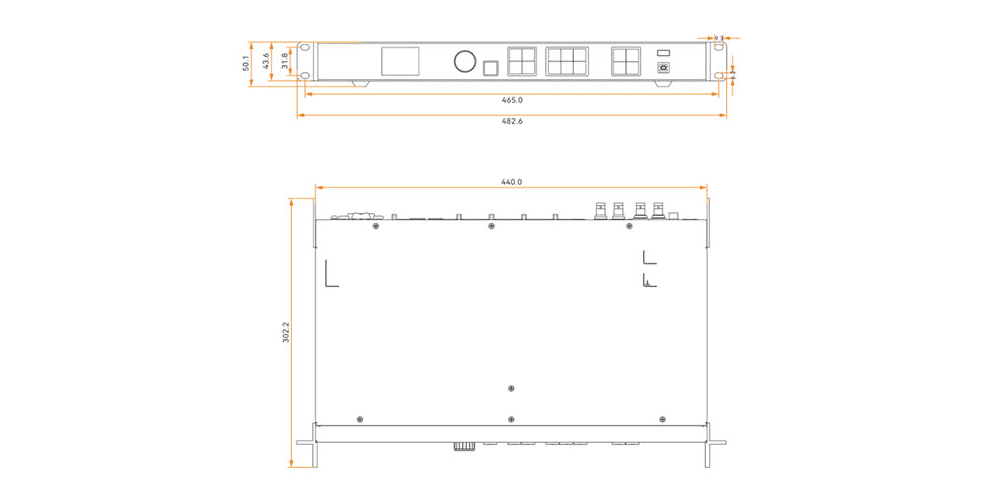
| Physical Specifications | Dimensions | 482.6 mm × 302.2 mm × 50.1 mm |
| Net Weight | 3.8 kg | |
| Total Weight | 6.4 kg | |
| Packing Information | Packing Box | 565 mm × 450 mm × 175 mm |
| Accessories | 1x Power cord, 1x Ethernet cable, 1x HDMI cable, 2x Silicone dustproof plugs, 1x USB cable, 1x Phoenix connector, 1x Quick Start Guide, 1x Certificate of Approval, 1x Safety Manual | |
| Optional Accessories | Remote Control | 1x Remote control (purchased separately) |
7.NovaStar VX400 Pro Resources Download
8.Conclusion
The Novastar VX400 Pro, as a multifunctional device integrating video processing and control, not only features stable performance and rich functions but is also suitable for various medium and large-sized LED display application scenarios. Whether in stage performances, commercial exhibitions, or fixed installation projects, it can bring you outstanding visual performance and a convenient operation experience.
 NovaStar H9 for Fine-Pitch LED screens: Features, Benefits, and Applications
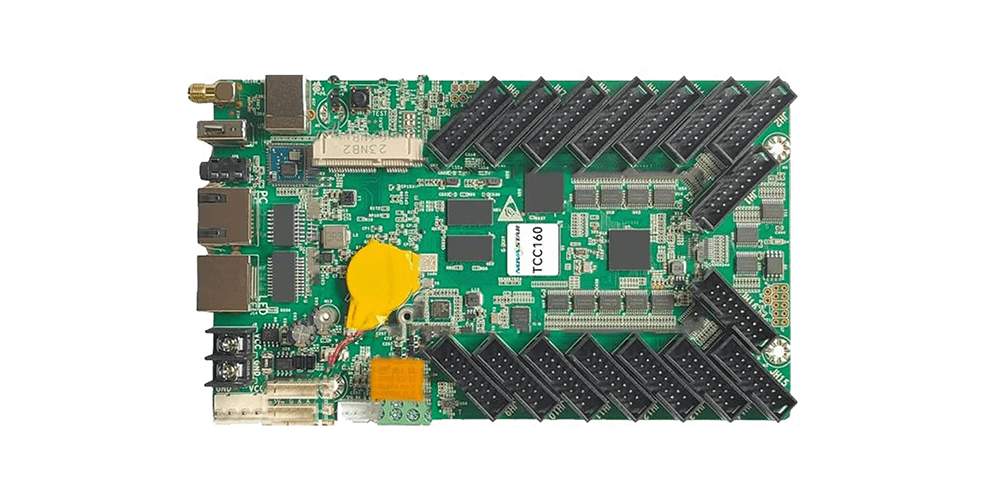 Novastar TCC160 Asynchronous LED display control card: Complete Guide and Overview