

2026-05-26T06:07:16+00:00May 29, 2026|Tags: FAQs NovaStar|
2026-05-20T06:32:04+00:00May 22, 2026|Tags: FAQs NovaStar|
2026-05-15T01:53:45+00:00May 15, 2026|Tags: LED Display Knowledge|
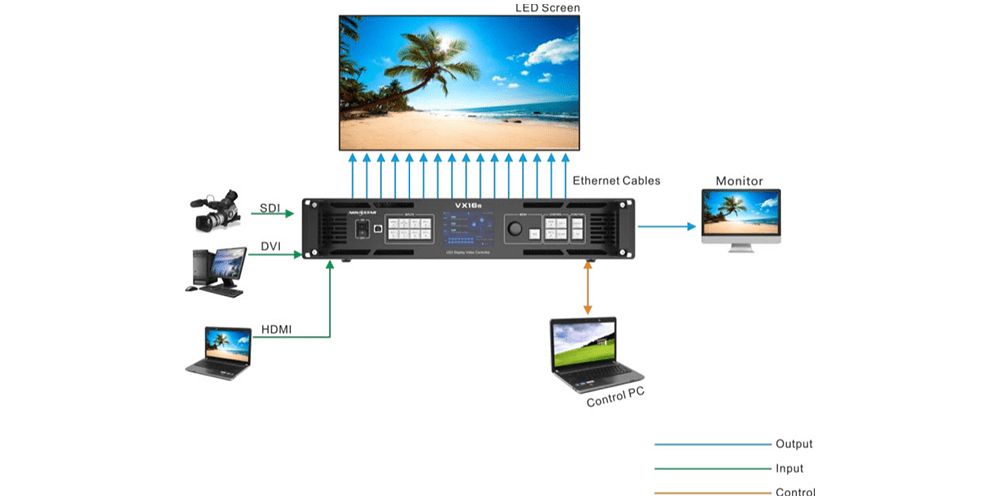
The NovaStar VX16s is a professional all-in-one 4K LED video processor designed for shows, broadcast, corporate events, and rental staging. It brings input switching, video scaling, image composition, and LED output control into one rack-ready unit. For teams that need a reliable, compact system with fewer boxes to manage, the VX16s is built to simplify setup and protect uptime.
This guide explains what the VX16s is, why it matters, how it operates, how it compares to other controllers, and where it fits best.
Table of Content
1.What is NovaStar VX16s?
The NovaStar VX16s is a 4K LED display video processor that combines signal management, scaling, playback, and LED control in a single device.
- Claim: The VX16s replaces separate processors, media servers, and switchers.
- Evidence: It supports native 4K input processing, multi-layer composition, and direct LED output.
- Insight: This reduces rack complexity, lowers the number of potential failure points, and speeds up both installation and strike.
Its all-in-one architecture is especially valuable for rental staging and touring productions where time and transport costs matter. Instead of building a signal chain from several boxes, the VX16s is intended to be the hub for content delivery and display control.
2.Key Features of the NovaStar VX16s
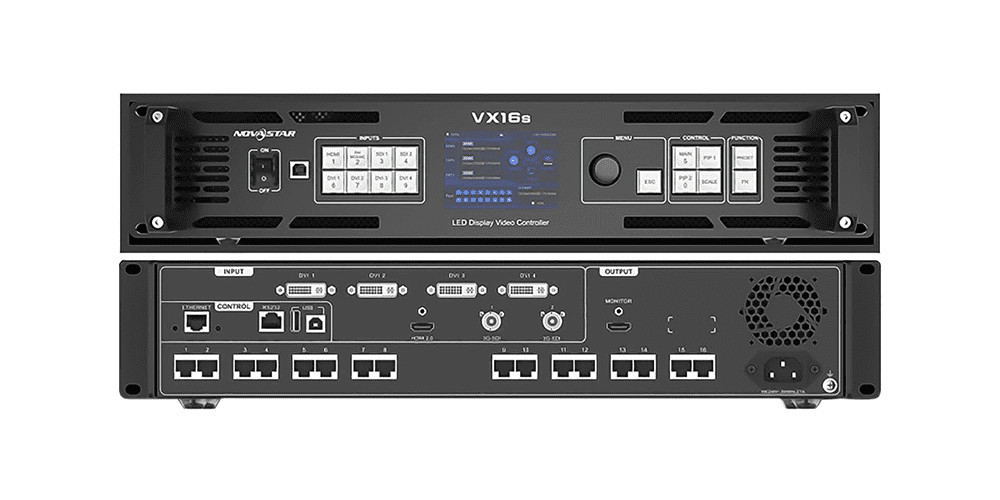
2.1 4K Input Support
One of the biggest advantages of the Novastar VX16s is its support for 4K-class input workflows. Modern LED display systems increasingly rely on high-resolution content sources such as:
- Media servers
- Presentation laptops
- Broadcast systems
- Playback devices
Without proper 4K handling, the entire display system can quickly feel outdated. The VX16s is designed to manage high-resolution signals smoothly, making it suitable for professional LED video wall applications.
2.2 Advanced Image Scaling
In real-world LED installations, the display resolution rarely matches the source resolution perfectly. That is where image scaling becomes extremely important.
The VX16s processes and scales content to fit different LED screen configurations while maintaining:
- Image clarity
- Proper aspect ratio
- Smooth visual performance
- Consistent display quality
Good scaling often goes unnoticed when it works correctly, but poor scaling can immediately affect the viewing experience.
2.3 Flexible Control and Operation
The VX16s is designed for live operation environments where quick adjustments are often necessary.
Users can manage the processor through:
- Front-panel controls
- Software configuration tools
- External control interfaces
This flexibility makes operation much easier in situations where multiple technicians or operators need to manage the same LED display system.
2.4 Integrated Video Processing and Sending
Another practical advantage is that the VX16s combines video processing and sending functions into a single device.
This integrated design helps:
- Reduce cable clutter
- Save rack space
- Simplify system architecture
- Lower potential failure points
While it may not sound flashy, this kind of streamlined setup becomes extremely valuable in long-term professional use.
3.Front and Rear Panel Layout of the NovaStar VX16s
The Novastar VX16s is designed with a practical front-and-rear layout that simplifies operation, monitoring, and system connectivity. The front panel focuses on real-time control and status visibility, while the rear panel handles signal transmission, power, and system integration.
3.1 Front panel
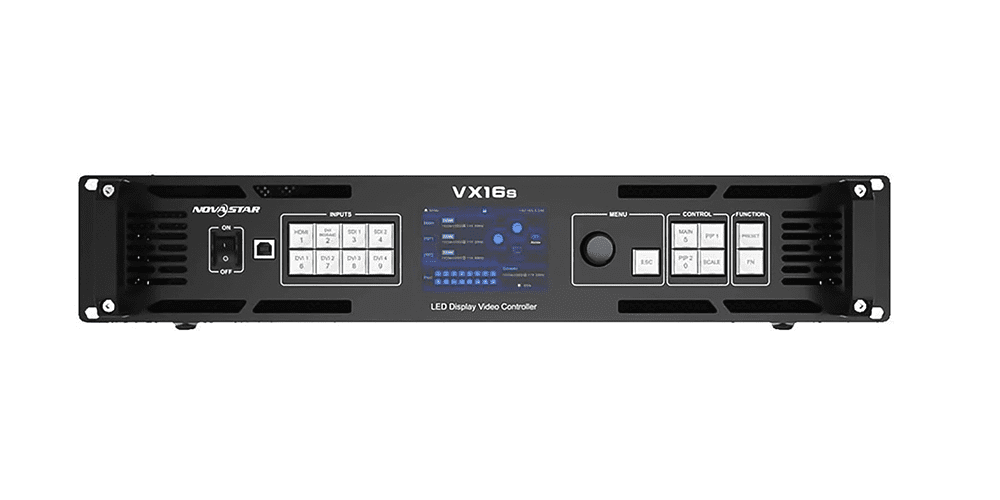
| Component | Function |
| Display Screen | Shows system status, signal information, and configuration details |
| Navigation Controls | Allows operators to access menus and adjust settings quickly |
| Quick-Access Buttons | Provides fast operational control during live events |
| Status Indicators | Displays running status, signal activity, and operational feedback |
| User Interface Layout | Designed for fast visibility in control rooms and backstage environments |
3.2 Rear panel
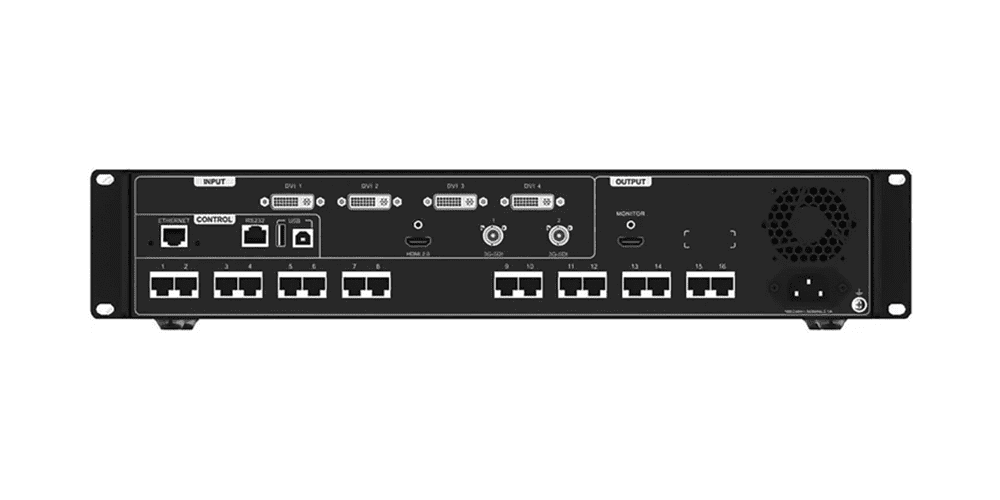
| Component | Function |
| Video Input Ports | Connects external signal sources such as media servers and laptops |
| LED Output Ports | Sends processed video signals to the LED display wall |
| Network Ports | Supports system communication and remote management |
| Control Interfaces | Enables external control integration and configuration |
| Sync Connections | Supports synchronization in larger display systems |
| Power Connection | Supplies stable power to the processor |
| Cable Management Area | Organizes signal and power cabling for cleaner installations |
4.Specifications of the NovaStar VX16s
The NovaStar VX16s is designed for professional LED video wall applications, offering stable signal processing, reliable system performance, and flexible deployment capabilities for medium and large-scale LED display projects.
| Electrical Specifications | Power connector | 100-240V~, 50/60Hz, 2.1A |
| Power consumption | 70 W | |
| Operating Environment | Temperature | 0°C to 50°C |
| Humidity | 20% RH to 85% RH, non-condensing | |
| Storage Environment | Temperature | -20°C to +60°C |
| Humidity | 10% RH to 85% RH, non-condensing | |
| Physical Specifications | Dimensions | 482.6 mm × 372.5 mm × 94.6 mm |
| Net weight | 6.22 kg | |
| Gross weight | 9.78 kg | |
| Packing Information | Carrying case | 530.0 mm ×420.0 mm ×193.0 mm |
| Accessories | 1x European power cord 1x US power cord 1x UK power cord 1x Cat5e Ethernet cable 1x USB cable 1x DVI cable 1x HDMI cable 1x Quick Start Guide 1x Certificate of Approval |
|
| Packing box | 550.0 mm ×440.0 mm ×215.0 mm | |
| Certifications | CE, FCC, IC, RoHS, UL, CB, KC | |
| Noise Level (typical at 25°C/77°F) | 45 dB (A) | |
5.Setup and Operation of the NovaStar VX16s
Getting the NovaStar VX16s into service usually involves several practical steps, including physical installation, signal connection, system configuration, and final testing. The processor is designed to simplify operation while still providing flexible control for professional LED display applications.
5.1 Home Screen
The Home Screen serves as the central overview interface for the operator.
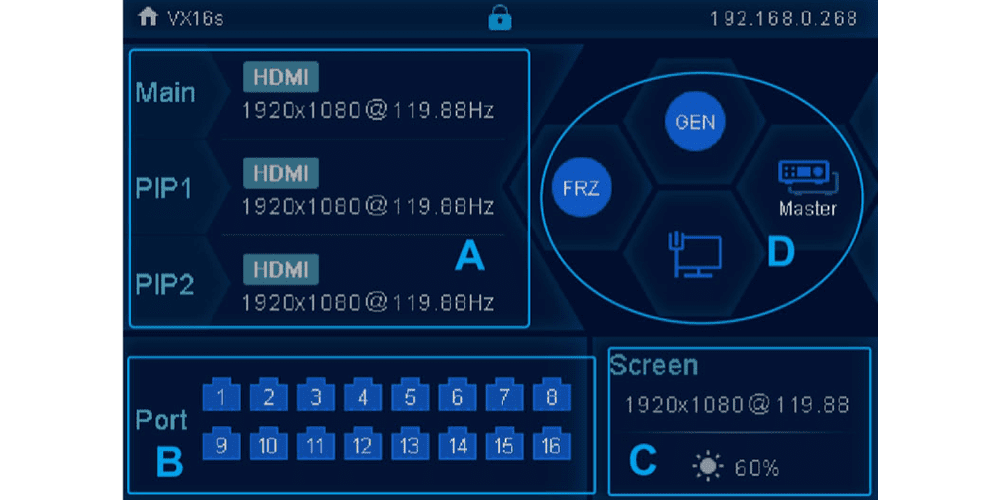
- Real-Time System Status
The home screen provides key operational information at a glance, including:
- Active input source
- Output status
- System health information
- Faster Troubleshooting
Operators can quickly confirm whether the processor is receiving a signal and whether the LED wall is functioning correctly without navigating through multiple menus.
- Improved Workflow Efficiency
A clear top-level display helps technicians react faster during live events and reduces unnecessary setup delays.
5.2 Screen Brightness
Brightness adjustment is essential for maintaining proper image quality under different environmental conditions.
- Adaptive Brightness Control
LED walls require different brightness levels depending on ambient lighting conditions.
- Better Visual Performance
Proper brightness settings help:
- Maintain accurate black levels
- Prevent oversaturated colors
- Improve viewing comfort
- Integrated Adjustment Functions
Built-in brightness controls reduce the need for separate external display adjustment systems.
5.3 Layer Settings
Layer management is one of the VX16s’ most valuable operational features.
- Multi-Source Display Support
Users can display multiple video sources simultaneously on a single LED screen.
- Flexible Layer Editing
Operators can:
- Resize layers
- Position content
- Overlay graphics
- Create picture-in-picture layouts
- Ideal for Live Production
Layer functions are especially useful for:
- Live camera feeds
- Event graphics
- Playback media
- Conference presentations
- Reduced External Equipment Requirements
Basic compositing can often be handled directly inside the VX16s without requiring a separate video mixer.
5.4 Quick Configuration
Quick configuration tools help simplify the setup process.
- Faster Deployment
Preconfigured setup workflows reduce installation time during live productions and events.
- Reduced Setup Complexity
Technicians can quickly establish a working display layout before fine-tuning detailed parameters.
- Improved Operational Reliability
Faster setup reduces pressure during short installation windows and minimizes configuration errors.
5.5 Preset Settings
Preset functions help operators maintain consistency across multiple projects or recurring events.
- Save Common Configurations
Frequently used display layouts and settings can be stored for future use.
- Quick Recall During Events
Operators can instantly load saved configurations without rebuilding the system from scratch.
- Reduced Human Error
Presets improve workflow consistency, especially in:
- Touring productions
- Rental LED systems
- Corporate presentations
5.6 Image Mosaic
Image mosaic functionality supports creative LED display layouts.
- Multi-Panel Image Distribution
The processor can divide content across multiple LED sections or display areas.
- Creative Screen Configurations
Mosaic modes support:
- Artistic stage designs
- Advertising walls
- Scenic LED installations
- Custom-shaped displays
- Expanded Visual Flexibility
These features allow the VX16s to support not only standard presentation systems but also more immersive and theatrical LED display applications.
6.NovaStar VX16s Applications and Use Cases
The NovaStar VX16s is designed for a wide range of professional LED display applications, combining flexible signal processing, stable output performance, and efficient system control.
6.1 Live Events and Concerts
The NovaStar VX16s is highly suitable for concerts, touring productions, and large-scale live events.
(1)Fast Setup and Deployment
Integrated processing and signal management simplify system installation and reduce setup time during live productions.
(2)Multi-Source Signal Handling
The processor can manage:
- Live camera feeds
- Playback systems
- Media servers
- Presentation content
(3)Reduced Equipment Complexity
Combining multiple functions into a single unit helps:
- Reduce transport weight
- Simplify rack configuration
- Improve operational efficiency
(4)Ideal for Touring Productions
Fast configuration and flexible control make the VX16s especially valuable in fast-paced event environments.
6.2 Corporate Events and Conferences
Corporate AV environments require stable playback, clean visuals, and reliable operation.
(1)Professional Presentation Support
The VX16s supports:
- Keynote presentations
- Conference LED walls
- Trade show displays
- Corporate branding content(
(2)Multi-Layer Display Control
Operators can combine:
- Live video
- Presentation slides
- Corporate graphics
- Background visuals
(3)Preset and Scene Management
Saved presets help teams switch between different presentation layouts quickly and consistently.
(4)Reliable Signal Stability
Stable output timing ensures smooth playback during important business events.
6.3 Broadcast and Studio Applications
Broadcast environments require precise signal synchronization and low-latency performance.
(1)Professional Signal Processing
The VX16s supports stable signal handling for studio and live broadcast workflows.
(2)Frame Synchronization Support
Frame-aligned output helps maintain smooth video performance when integrated with:
- Cameras
- Video switchers
- Broadcast systems
(3)LED Background Integration
The processor can reliably drive:
- Studio LED walls
- Virtual production backgrounds
- Broadcast graphics displays
(5)Low-Latency Operation
Reduced signal delay is important for real-time production environments.
6.4 Rental Staging and Fixed Installations
The VX16s is suitable for both temporary rental applications and long-term fixed LED installations.
(1)Rental-Friendly Design
Features such as:
- Rack-mount structure
- Quick configuration
- Preset recall
make the processor highly adaptable for repeated deployments.
(2)Flexible Application Support
Rental companies can use the same unit across:
- Concerts
- Corporate events
- Church LED walls
- Exhibition displays
(3)Compact System Integration
The integrated design reduces rack space and simplifies installation workflows.
(4)Reliable Long-Term Operation
For fixed installations, the VX16s provides a stable and serviceable LED display control solution.
7.FAQs
Q1:Is the NovaStar VX16s a true 4K LED video processor?
Yes, it is designed for 4K-capable LED workflows. The exact way that 4K is handled depends on your source, output setup, and the size of the display canvas.
Q2:Can the VX16s work as an all-in-one device?
That is one of its main advantages. It combines processing and LED sending in a single unit, which makes setup simpler and keeps the rack cleaner.
Q3:Do I still need to configure the screen mapping manually?
Usually, yes. The processor handles the signal path, but the LED wall still needs to be mapped correctly so the cabinets line up with the image.
Q4:Is it better for rental use or permanent installation?
Both, honestly. Rental teams like the speed and flexibility, while fixed installs appreciate the stability and the reduced box count.
Q5:What should I check before buying one used?
Check the condition of the ports, verify the firmware level, confirm that it matches your display load, and make sure you can access the proper NovaStar software and files.
Q6:Where should I start if the output looks wrong?
Start with the basics: source resolution, canvas size, screen mapping, and cable order. Most LED problems come from one of those four things, not from the processor itself.
8.Conclusion
The NovaStar VX16s is the kind of LED video processor that makes sense when the job calls for 4K processing, practical control, and enough flexibility to handle real-world display layouts. It is not trying to be mysterious, and that is part of the appeal. You get a processor that can sit in front of a serious LED wall and keep the whole system moving without a lot of drama. For integrators, operators, and event teams, that reliability is usually the thing that matters most.
If your project needs a balanced mix of performance, everyday usability, and support for larger LED applications, the VX16s is very much worth a close look. And if you already work with NovaStar gear, it fits into that ecosystem in a way that feels familiar rather than disruptive. In the end, that is often what people want from a processor like this: something powerful enough for the job, but still pleasant to live with once the wall is on and the show is running.
 Novastar VX2000 Pro vs VX2000:Everything You Need to Know Before Buying