
2026-09-17T03:16:22+00:00September 20, 2026|Tags: LED Display Knowledge|
2026-09-15T03:13:01+00:00September 15, 2026|Tags: LED Display Knowledge|
2026-09-17T06:25:39+00:00September 8, 2026|Tags: LED Display Knowledge|
In today’s fast-paced digital world, LED display controllers are becoming increasingly vital for businesses and organizations seeking to deliver high-quality visual experiences. The Novastar MBOX600 Pro is a cutting-edge industrial controller that combines an industrial PC with advanced sending capabilities, offering unparalleled control and versatility for specialized advertising media displays. Whether you’re managing large-scale outdoor screens or intricate indoor installations, the MBOX600 Pro ensures seamless operation, robust performance, and extensive scalability.
This blog post will guide you through everything you need to know about the Novastar MBOX600 Pro, from its standout features and technical specifications to practical applications and user-friendly functionalities. Let’s dive in!
Table of Content
1.Advantages of the Novastar MBOX600 Pro
The Novastar MBOX600 Pro is more than just a controller—it’s a comprehensive solution for managing LED displays in professional environments. Here are some of its standout advantages:
1.1 High Pixel Capacity and Output Flexibility
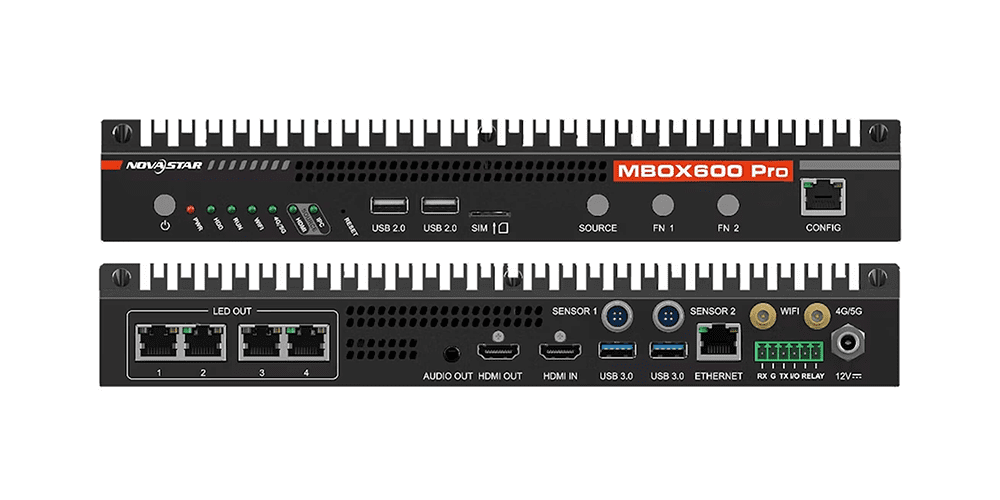
- 4x Gigabit Ethernet Outputs:Capable of handling up to 2,600,000 pixels, the MBOX600 Pro ensures smooth operation even for large-scale displays.
- Output Scaling: With pixel width ranging from 64 to 4096 and height from 64 to 1920, users can customize resolutions to suit their specific needs.
- HDMI 1.3 Input and Output: Supports common resolutions like 1920×1080 and 2048×1152, making it compatible with most modern displays.
1.2 Powerful Processing Capability
Equipped with an Intel® Processor N97, the MBOX600 Pro boasts:
- 4 Cores and 4 Threads: Delivers exceptional multitasking performance.
- Turbo Frequency Up to 3.6 GHz: Ensures rapid data processing and seamless video playback.
- RAM Options (4 GB/8 GB):Provides ample memory for running complex applications.
- SSD Storage (128 GB/256 GB):Offers fast access to stored files and configurations.
1.3 Versatile Connectivity
- USB Ports:Includes 2x USB 2.0 and 2x USB 3.0 ports for connecting peripherals like keyboards, mice, and storage devices.
- Gigabit Ethernet Ports: Facilitates reliable communication and remote management over LANs or public networks.
- Wi-Fi and 4G/5G Support: Enables wireless connectivity for unattended scenarios, such as outdoor fixed screens.
1.4 SNMP System Monitoring
The Novastar MBOX600 Pro integrates SNMP (Simple Network Management Protocol) capabilities, allowing users to monitor and manage their LED display systems professionally. This feature is particularly beneficial for advertising media display users who require real-time insights into system performance.
2.Novastar MBOX600 Pro Appearance
2.1 Front Panel
| Name | Description |
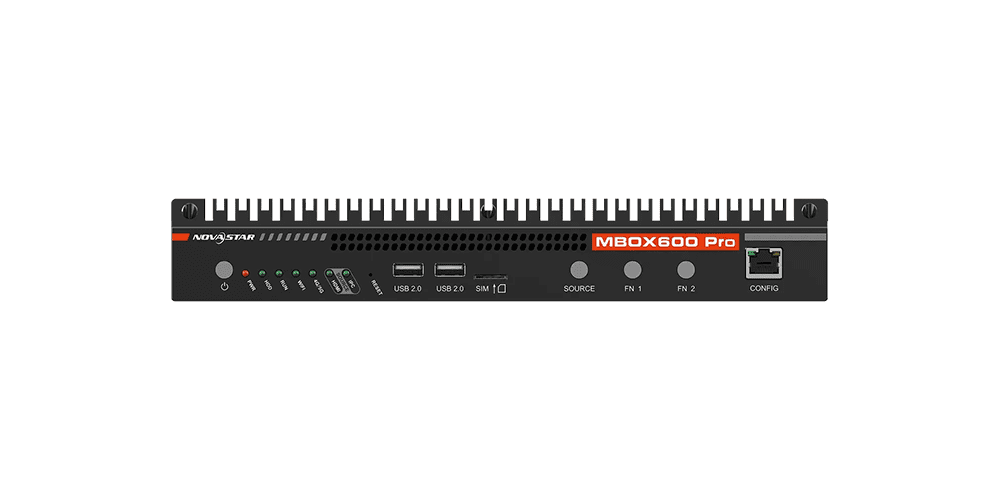
| Power Button | Short press: Power on/off; Long press: Force shutdown. |
| RESET | Factory reset button. Press for 10 seconds to restore factory settings. |
| USB 2.0 Ports | Two ports for connecting peripherals like a mouse, keyboard, or USB drive. |
| SIM Card Slot | Designed to prevent incorrect insertion of SIM cards. |
| SOURCE | Switches between internal source and HDMI 1.3 source. |
| FN Buttons | Customizable buttons (to be implemented in future updates). |
| CONFIG Port | Ethernet port for device debugging (default IP: 192.168.0.10). |
2.2 Rear Panel
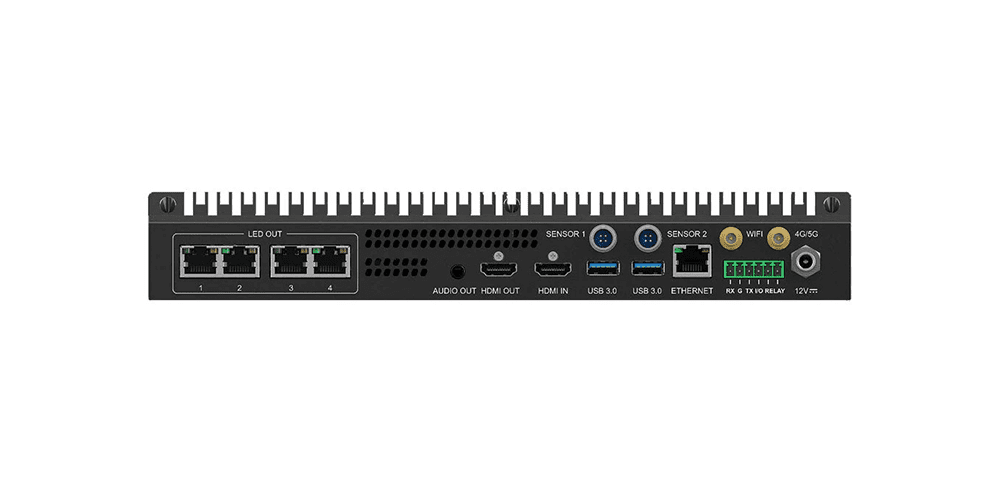
| Connector Type | Connector Name | Description |
| HDMI IN | Input | Supports resolutions up to 2048×1152@60Hz. |
| LED OUT | Output | Four Gigabit Ethernet outputs with a max pixel capacity of 2,600,000. |
| AUDIO OUT | Output | 3.5 mm audio jack for stereo output. |
| HDMI OUT | Output | Additional HDMI 1.3 output for extended connectivity. |
| SENSOR 1 & 2 | Control | Connectors for light sensors (recommended NovaStar sensors). |
| USB 3.0 Ports | Control | Two ports for high-speed peripheral connections. |
| ETHERNET | Control | Gigabit Ethernet port for LAN or public network access. |
| Antenna Connectors | Wi-Fi/4G/5G | Dedicated connectors for Wi-Fi and 4G/5G antennas. |
3.Novastar MBOX600 Pro Features
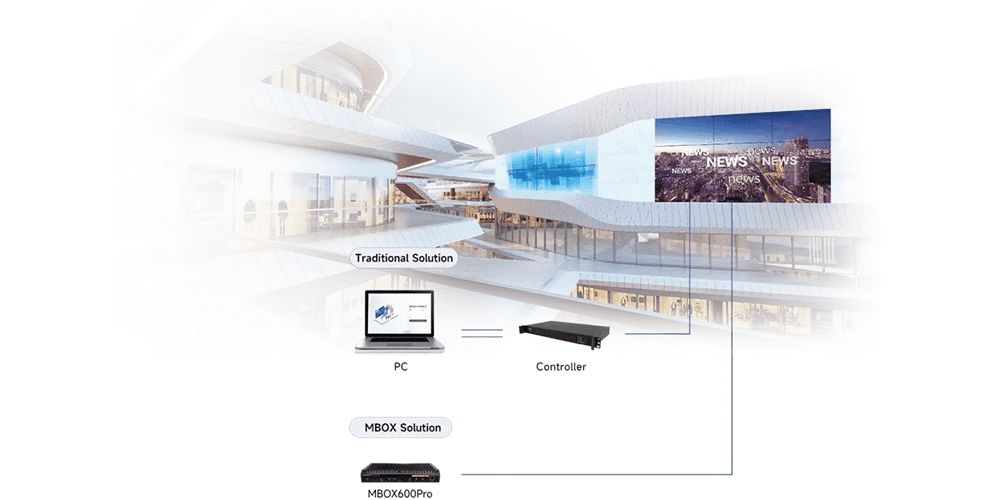
3.1 All-in-One Design
Combines an industrial PC and sending card to reduce wiring, simplify installation, and enhance reliability.
3.2 Easy Web Control
Works on Windows and Linux, offering browser-based configuration and maintenance.
3.3 Smart Peripherals
Automatically adjusts LED brightness using ambient light and receiving-card temperature sensors.
3.4 SNMP Monitoring
Supports SNMP V2/V3 for efficient, low-cost network management.
3.5 Remote Diagnostics
Provides real-time device status over LAN for visual operation, maintenance, and precise fault detection.
3.6 Cloud Integration
Enables intelligent remote control and management.
4.Specifications of the Novastar MBOX600 Pro
| Size | 319.0mm×135.9mm×45.5mm |
| Input Voltage | DC 12V 7A |
| Stand-by Power Consumption | ≈1.6w |
| Loading Capacity | 2.6 Million |
| Maximum Width & Height | Maximum Width: 4096
Maximum Height: 1920 |
| OS | Windows:Windows: Windows 10&11 loT Enterprise
Linux:ubuntu22.04 |
| WiFi | WiFi(Station) , WiFi 5, 2.4G/5G |
| CPU | Intel® Processor N97 |
| Storage | 4G+128G、8G+256G |
| Input Ports | 1 × HDMI 1.3
2 × USB 2.0 2 × USB 3.0 |
| Output Ports | 4 × RJ45
1 × HDMI 1.3 1 × 3.5mm Audio |
| Control Ports | 2 × Gigabit Ethernet Port
1 × RS232 2 × Sensor Port |
| Free Scaling | Support |
| SNMP | Support |
| Remote Control | Support |
5.Applications of the Novastar MBOX600 Pro
The versatility of the Novastar MBOX600 Pro makes it suitable for a wide range of applications:
5.1 Outdoor Advertising Screens
With its robust build and support for unattended operations, the Novastar MBOX600 Pro excels in managing outdoor LED displays. Its ability to connect to Wi-Fi or 4G/5G networks ensures uninterrupted content delivery.
5.2 Large-Scale Events
From concerts to corporate gatherings, the Novastar MBOX600 Pro delivers high-quality visuals across expansive venues. Its high pixel capacity and low latency make it ideal for live events.
5.3 Indoor Digital Signage
For malls, airports, and stadiums, the MBOX600 Pro provides consistent performance and easy scalability, ensuring engaging visual experiences for audiences.
6.How the Novastar MBOX600 Pro Works
The versatility of the NovaStar MX2000 Pro makes it suitable for a wide range of applications:
- Rental Services:Ideal for large events requiring high-resolution displays and seamless transitions.
- xR/VP Studios: Delivers pixel-perfect backgrounds for immersive virtual production environments.
- TV Production: Ensures consistent color and brightness for broadcast-quality visuals.
- E-Sports Events:Supports high frame rates and low latency for competitive gaming setups.
- Exhibition Halls: Powers large fixed installations with irregular screen shapes.
7.Novastar MBOX600 Pro User Manual Download
8.FAQ
Q1.What is the primary function of the Novastar MBOX600 Pro?
The MBOX600 Pro integrates an industrial PC with advanced sending capabilities, designed for managing and operating LED displays with precision.
Q2.Does it support 4K resolution?
While the MBOX600 Pro supports resolutions up to 2048×1152, it does not natively support 4K but excels in high-definition applications.
Q3.Can I use it for outdoor installations?
Yes, its rugged design and SNMP monitoring make it ideal for outdoor fixed screens.
9.Conclusion
By now, you should have a comprehensive understanding of the Novastar MBOX600 Pro and its capabilities. Whether you’re a seasoned professional or new to LED display technology, this industrial controller promises to elevate your projects to new heights. Stay tuned for more insights and tutorials on maximizing your LED display experience!