
2026-07-31T09:55:54+00:00July 31, 2026|
2026-07-10T08:00:35+00:00July 10, 2026|Tags: 2026, LED Display Knowledge, Top Manufacturer|
If you’re deciding between the Novastar VX400 and the Novastar VX400 Pro, the most important difference is flexibility. The VX400 is designed for standard LED display applications such as corporate events, churches, meeting rooms, and fixed installations. The VX400 Pro builds upon that foundation with enhanced connectivity, more advanced layer management, stronger screen control functions, and improved workflow efficiency for demanding rental and live-production environments.
For buyers focused on reliability and budget, the VX400 remains an excellent choice. For rental companies, concert productions, touring events, and larger LED display systems, the VX400 Pro is often the better long-term investment.
Table of Content
1.Novastar VX400 Pro and VX400 at a Glance
The Novastar VX400 and VX400 Pro belong to the same controller family, but they target different project requirements. While both units are capable LED display controllers, the VX400 Pro introduces several enhancements aimed at improving flexibility, processing performance, and operational efficiency.
Understanding these differences before purchasing can help avoid overbuying features you do not need or underestimating the demands of future projects.
1.1 What Is the Novastar VX400?
The VX400 is designed as a dependable controller for everyday LED display applications.
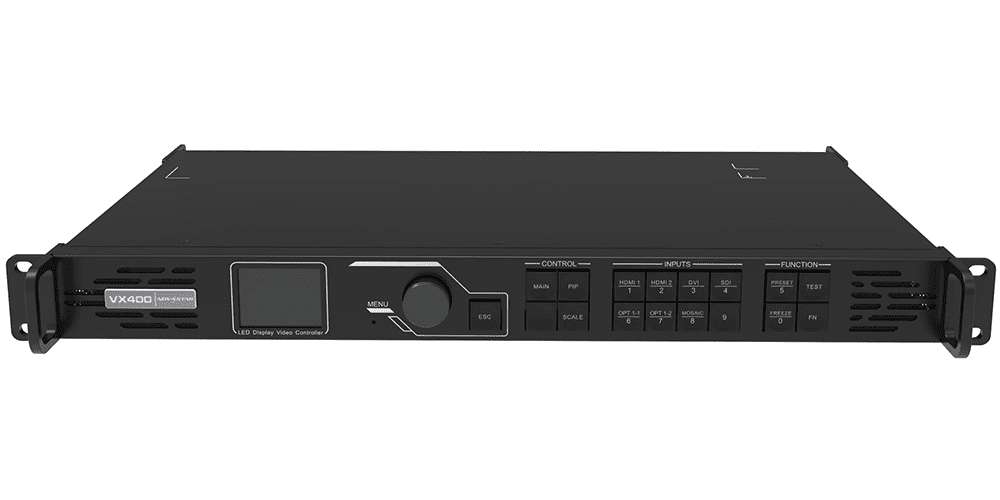
Typical applications include:
- Corporate AV systems
- Church LED displays
- Conference rooms
- Exhibition booths
- Small and medium-sized rental events
- Fixed LED installations
Key advantages include:
- Reliable signal processing
- Stable image quality
- Straightforward operation
- Cost-effective deployment
For organizations that prioritize simplicity and dependable performance, the VX400 remains one of the most practical solutions in Novastar’s controller lineup.
1.2 What Is the Novastar VX400 Pro?
The VX400 Pro is positioned as the upgraded version of the VX400, targeting users who require more advanced control capabilities.
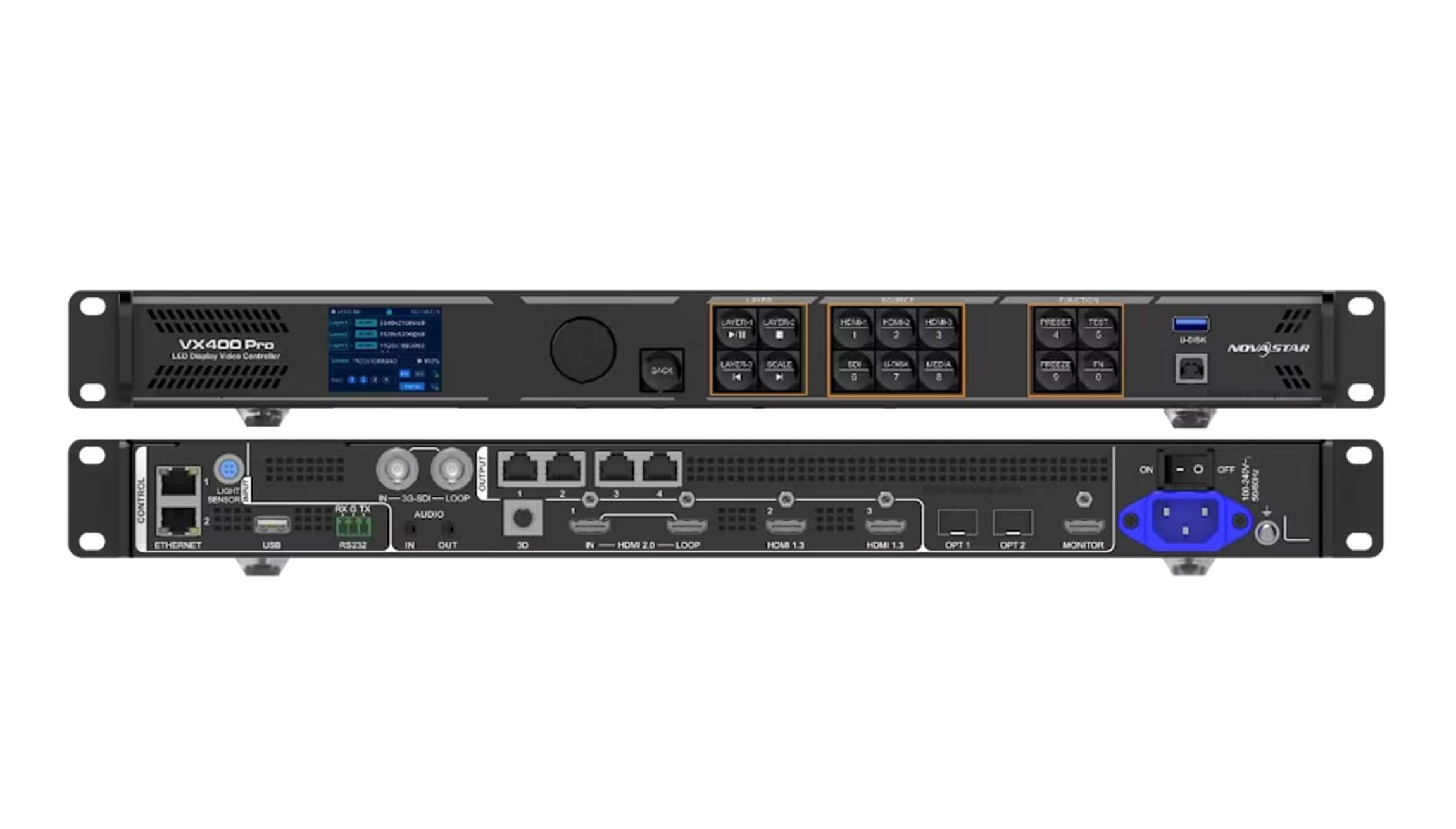
Typical applications include:
- Concert productions
- Touring events
- Large rental LED screens
- Multi-screen staging systems
- Broadcast environments
- Complex live productions
Compared with the VX400, the VX400 Pro focuses on:
- Expanded connectivity options
- More powerful video processing
- Enhanced layer management
- Faster operational workflow
- Improved screen diagnostics and control
These enhancements make the VX400 Pro more suitable for demanding production environments where flexibility and efficiency are critical.
1.3 Novastar VX400 Pro VS VX400 Quick Comparison Table
| Comparison Item | VX400 | VX400 Pro |
| Product Position | Standard LED Controller | Advanced LED Controller |
| Best For | Corporate AV, churches, fixed installs | Rental, concerts, live production |
| Connectivity Flexibility | Good | Better |
| Video Processing | Standard | Enhanced |
| Layer Management | Basic multi-layer workflows | Advanced multi-layer workflows |
| Screen Management | Essential functions | Advanced diagnostics and mapping |
| Workflow Efficiency | Good | Faster setup and operation |
| Future Scalability | Moderate | Higher |
| Investment Cost | Lower | Higher |
Buyer Recommendation
Choose the VX400 if your projects focus on reliability, straightforward operation, and budget control.
Choose the VX400 Pro if your work involves larger LED displays, multiple video sources, frequent setup changes, or complex live-event environments.
2.Difference #1: Input and Output Connectivity
Connectivity is a buyer-critical feature because it determines whether the controller will fit the existing production chain.
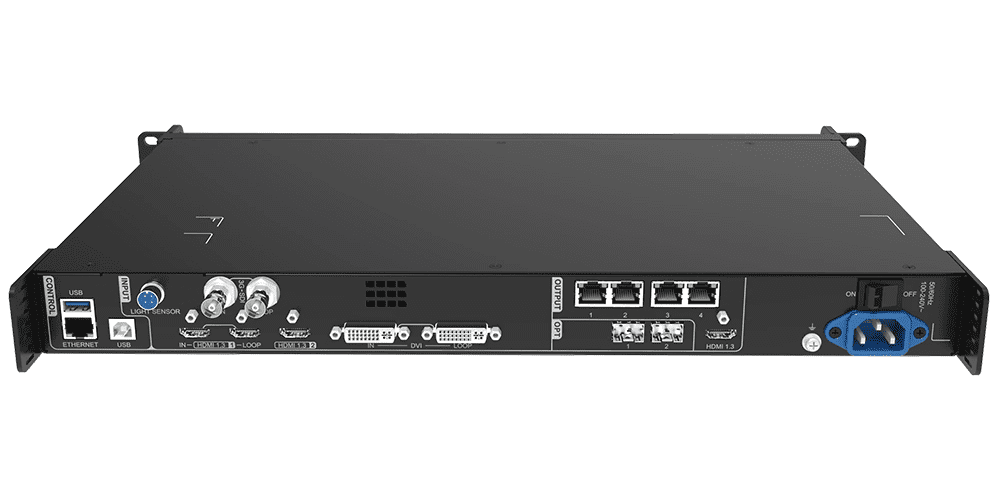
2.1 VX400 Connectivity Overview
The VX400 provides standard signal ports suitable for many event setups, including HDMI, DVI, and legacy formats.
Suitable environments include:
- Corporate presentations
- Churches
- Meeting rooms
- Exhibition displays
- Small rental systems
For these applications, the available interfaces are generally sufficient for reliable day-to-day operation.
The VX400 is particularly attractive to users who want a straightforward system without unnecessary complexity.
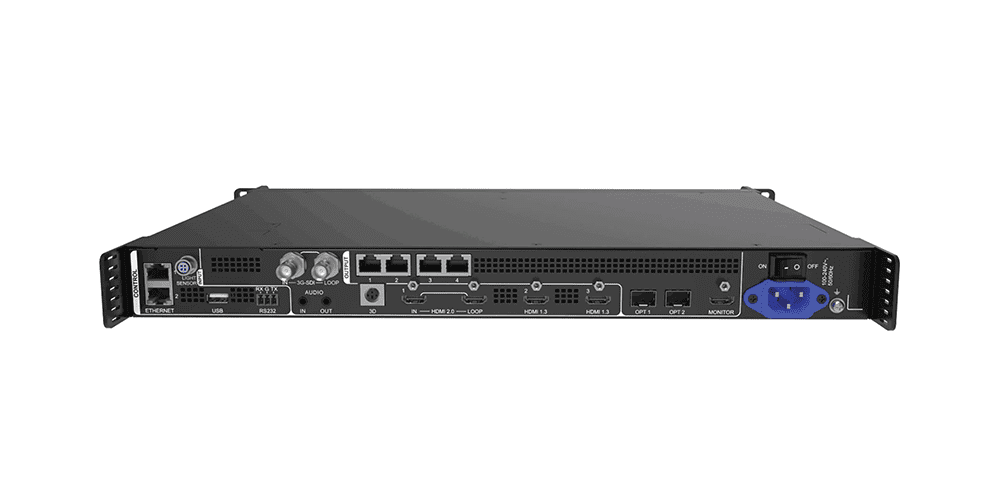
2.2 VX400 Pro Connectivity Improvements
The VX400 Pro expands connectivity options to better accommodate modern production workflows.
Benefits include:
- Easier integration with multiple content sources
- Improved compatibility with advanced production systems
- Reduced reliance on external adapters
- Greater flexibility for future upgrades
For rental companies that regularly work with different client equipment, these additional connectivity options can significantly simplify setup and troubleshooting.
2.3 Why This Difference Matters
Many buyers focus on current requirements while overlooking future needs.
For example:
A conference room installation may only require a single presentation source, making the VX400 perfectly adequate.
However, a concert production may involve:
- Media servers
- Live cameras
- Video switchers
- Playback systems
- Graphics generators
In these environments, the additional flexibility of the VX400 Pro can save valuable setup time and reduce operational risk.
Buyer Impact
Choose VX400 if:
- You use simple signal workflows
- Most projects use one or two content sources
- Cost efficiency is a priority
Choose VX400 Pro if:
- You frequently integrate multiple video sources
- Your production environment changes regularly
- Future scalability is important
3.Difference #2: Video Processing Performance
Video processing performance directly affects playback quality, image scaling, latency, and overall system responsiveness.
As LED displays continue to grow in size and complexity, processing power becomes increasingly important.
3.1 Processing Architecture Comparison
The VX400 is engineered to deliver stable performance for conventional LED display applications.
It performs well when handling:
- Presentation content
- Video playback
- Static graphics
- Standard event production
The VX400 Pro, however, is optimized for more demanding environments where multiple sources and dynamic content are common.
Its additional processing headroom allows it to manage complex workflows more efficiently.
3.2 Real-World Performance Benefits
In larger productions, processing limitations can become visible through:
- Slower screen updates
- Reduced flexibility
- Increased setup complexity
The VX400 Pro is better suited for:
- Fast-moving visual content
- Multiple video inputs
- Large-format LED displays
- Dynamic live productions
This additional performance reserve provides operators with greater confidence during mission-critical events.
3.3 Why Processing Power Matters
Not every project requires maximum performance.
A church LED wall displaying lyrics and sermon content will rarely stress the controller.
By contrast, a concert LED wall displaying multiple video feeds and animated content places much greater demands on the processing system.
Real-World Example
A hotel conference room using PowerPoint presentations and occasional video playback will likely see no significant benefit from upgrading to the VX400 Pro.
A touring production company operating large LED walls and multiple content sources may immediately benefit from the VX400 Pro’s enhanced processing capabilities.
Buyer Impact
Choose VX400 if:
- Your content is relatively simple
- You operate fixed installations
- Budget optimization is important
Choose VX400 Pro if:
- You manage large-scale productions
- You regularly use multiple video sources
- You require greater processing flexibility
4.Difference #3: Layer Management and Content Flexibility
Modern LED productions increasingly rely on multiple content layers. The ability to quickly arrange, resize, and manage visual elements can dramatically improve production efficiency.
4.1 VX400 Layer Capabilities
The VX400 provides reliable multi-layer functionality suitable for many standard applications.
Typical use cases include:
- Corporate presentations
- Worship services
- Exhibition displays
- Basic event production
For straightforward content layouts, its capabilities are generally more than sufficient.
4.2 VX400 Pro Layer Improvements
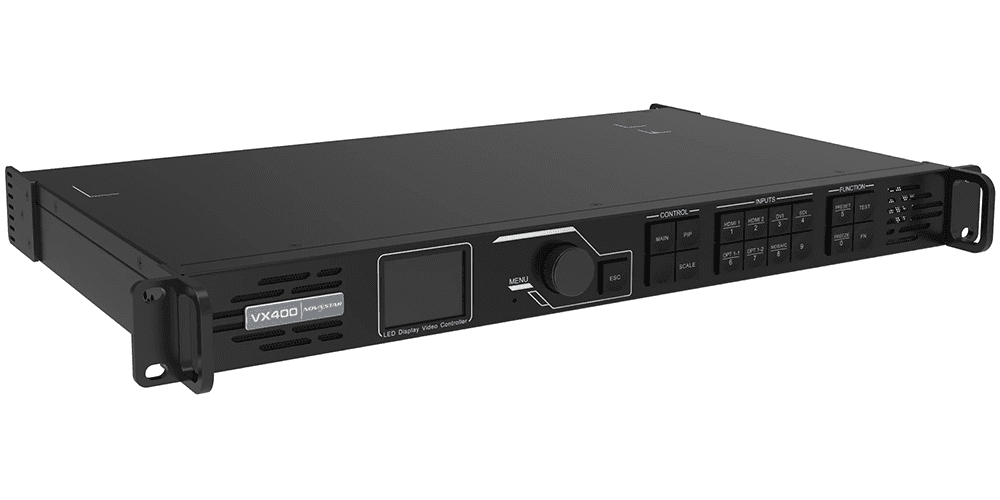
The VX400 Pro expands content-management flexibility by offering more advanced layer control.
Benefits include:
- Faster layout adjustments
- Greater creative freedom
- More efficient content switching
- Improved support for complex visual compositions
This is particularly useful when operators need to react quickly during live events.
4.3 Why Layer Flexibility Matters
In modern productions, content often includes:
- Live camera feeds
- Presentation slides
- Sponsor graphics
- Background animations
- Social media content
Managing all these elements efficiently can significantly impact show quality.
Buyer Impact
Choose VX400 if:
- Your content layouts rarely change
- Most projects involve simple visual presentations
Choose VX400 Pro if:
- You frequently build complex screen layouts
- You require rapid scene changes
- Creative flexibility is a major priority
5.Difference #4: User Interface and Operational Efficiency
For rental companies and live event operators, setup speed can be just as important as hardware specifications. A controller that is easier to configure can significantly reduce preparation time, minimize operator mistakes, and improve workflow efficiency during live productions.
5.1 VX400 User Interface
The Novastar VX400 provides a straightforward operating interface designed for standard LED display deployments.
Key characteristics include:
- Traditional menu structure
- Reliable screen configuration tools
- Basic layer adjustment functions
- Standard monitoring capabilities
For experienced LED technicians, the VX400 offers a familiar workflow that is easy to learn and deploy across common rental and fixed-installation projects.
5.2 VX400 Pro Workflow Improvements
The VX400 Pro introduces a more refined user experience with faster access to critical functions.
Enhancements include:
- Faster screen mapping
- More intuitive menu navigation
- Improved layer management controls
- Quicker source switching
- Enhanced monitoring and diagnostics
These improvements become particularly valuable when working under time pressure, such as concerts, exhibitions, corporate events, and live broadcasts.
5.3 Why Operational Efficiency Matters
Many buyers focus exclusively on hardware specifications while overlooking labor costs.
For example, a rental company deploying 50 events per year may save hours of setup time through faster configuration and troubleshooting. Over several years, those labor savings can easily exceed the initial price difference between the VX400 and VX400 Pro.
Buyer Recommendation:
- Choose the VX400 for straightforward LED installations.
- Choose the VX400 Pro if rapid deployment and workflow efficiency are critical to your business.
6.Difference #5: LED Screen Management Functions
As LED display projects become larger and more complex, advanced screen management tools become increasingly important.
This is one of the most significant areas where the Novastar VX400 Pro VS VX400 comparison becomes relevant.
6.1 Screen Management on VX400
The VX400 provides the essential functions required for most standard projects, including:
- Brightness adjustment
- Screen calibration
- Receiving card management
- Basic monitoring
- Signal status checking
For many indoor LED displays, conference rooms, and standard rental screens, these features are sufficient.
6.2 Advanced Management Features on VX400 Pro
The VX400 Pro expands screen control capabilities with more sophisticated management tools.
Advantages include:
- Faster screen mapping
- Enhanced diagnostics
- Improved fault detection
- Better large-screen management
- More efficient monitoring of multiple receiving cards
These features are especially valuable for large LED walls where troubleshooting speed directly affects event reliability.
6.3 Real-World Example
Imagine a 150-square-meter rental LED screen used at a major concert.
If a display issue occurs minutes before the show begins:
- The VX400 allows technicians to identify basic problems.
- The VX400 Pro provides deeper diagnostics and faster fault isolation.
For large productions, this difference can prevent costly delays and protect event schedules.
6.4 Buyer Takeaway
If your projects involve:
- Large LED video walls
- Touring productions
- Stadium displays
- Broadcast environments
the VX400 Pro’s advanced management functions provide meaningful operational advantages.
7.Difference #6: Application Scenarios
One of the easiest ways to choose between the VX400 and VX400 Pro is to evaluate your typical project type.
Both controllers are excellent products, but they serve different levels of production complexity.
7.1 Best Applications for VX400
The Novastar VX400 is ideal for:
Corporate Meeting Rooms
Many conference room LED displays require stable playback without advanced layering or complex signal routing.
Small to Medium Rental Projects
Examples include:
- Wedding LED screens
- Church LED displays
- Hotel conference events
- School auditoriums
- Local stage productions
Fixed Indoor Installations
The VX400 provides excellent value for:
- Retail stores
- Shopping malls
- Showrooms
- Educational facilities
For these environments, the controller’s capabilities are often more than sufficient.
7.2 Best Applications for VX400 Pro
The VX400 Pro is better suited for demanding production environments.
Concerts and Touring Events
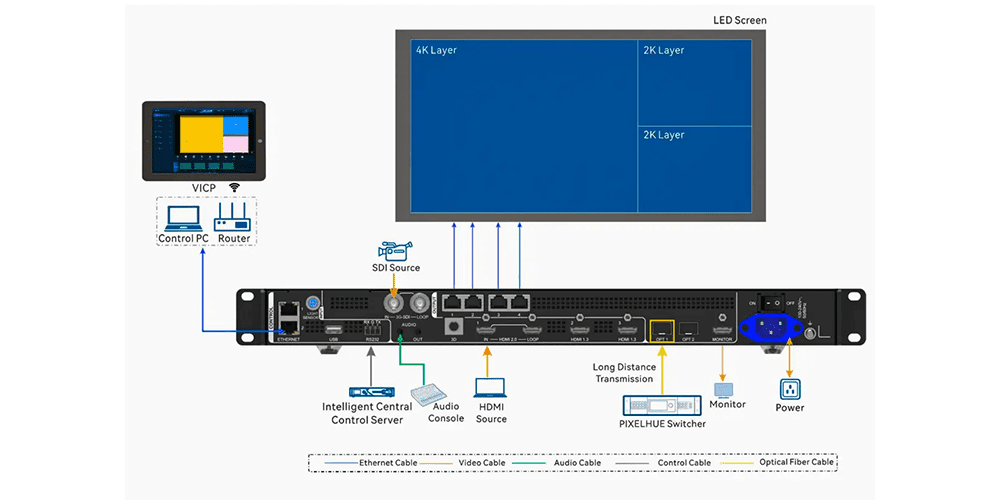
Modern concerts frequently require:
- Multiple video sources
- Complex visual layouts
- Dynamic content switching
The VX400 Pro handles these workflows more effectively.
Broadcast and Live Production
Live broadcasts place higher demands on:
- Signal processing
- Stability
- Low-latency performance
The VX400 Pro provides greater operational flexibility in these situations.
Large Rental Companies
Rental providers serving high-end events often benefit from:
- Faster deployment
- Better diagnostics
- Broader compatibility
These advantages can improve profitability over time.
7.3 Future-Proofing Considerations
If your business expects to grow into larger LED projects over the next few years, the VX400 Pro may be the better long-term investment.
Its additional processing power and management features provide more room for future expansion.
8.Difference #7: Price vs Value
8.1 VX400 price positioning
The VX400 is the more budget-friendly option, ideal for cost-conscious buyers.
8.2 VX400 Pro premium positioning
The VX400 Pro costs more, reflecting its upgraded capability set.
8.3 Value analysis
For rental companies, the VX400 Pro can justify the price if it supports larger shows, quicker setup, and broader compatibility. For simpler installs, the VX400 is often the better ROI.
9.Buying Recommendations
9.1 Best choice for rental companies
Choose VX400 Pro for large rental productions and complex workflows; choose VX400 for mid-tier event fleets.
9.2 Best choice for fixed installs
The VX400 is often the right match for corporate installs that need dependable control without premium complexity.
9.3 Best choice for technical production teams
If your team demands advanced control and faster setup, the VX400 Pro is the safer option.
9.4 Final purchase guidance
Buy the VX400 for cost-efficient reliability. Buy the VX400 Pro for premium capability and future-ready flexibility.
10.FAQs
10.1 Is VX400 Pro a replacement for VX400?
No. The VX400 Pro is a newer premium option, but the VX400 remains a valuable lower-cost choice.
10.2 Does VX400 Pro support more advanced video processing?
Yes. The VX400 Pro is designed for heavier processing loads and more challenging live workflows.
10.3 Which model is better for rental LED displays?
For larger rental rigs, VX400 Pro is better. For smaller rental packages, VX400 is more economical.
10.4 Is the VX400 still worth buying in 2026?
Yes—especially when budget and simplicity are priorities. It remains a strong choice for standard rental and corporate installs.
10.5 Can both controllers support the same LED screens?
Often yes, but the VX400 Pro offers greater flexibility and stronger large-array support.
11.Conclusion
When comparing Novastar VX400 Pro VS VX400, there is no universal winner—only the right choice for your specific application.
The Novastar VX400 remains an excellent controller for standard rental LED displays, corporate AV systems, retail video walls, and fixed installations where reliability and affordability are the top priorities.
The Novastar VX400 Pro, on the other hand, delivers meaningful upgrades in connectivity, video processing, layer management, operational efficiency, and screen control. These advantages make it a stronger choice for large rental productions, live events, touring applications, and complex LED display environments.
If your goal is maximum value at the lowest cost, the VX400 is difficult to beat. If you need greater flexibility, stronger performance, and better long-term scalability, the VX400 Pro is the smarter investment for 2026 and beyond.