
2026-09-17T03:16:22+00:00September 20, 2026|Tags: LED Display Knowledge|
2026-09-15T03:13:01+00:00September 15, 2026|Tags: LED Display Knowledge|
2026-09-17T06:25:39+00:00September 8, 2026|Tags: LED Display Knowledge|
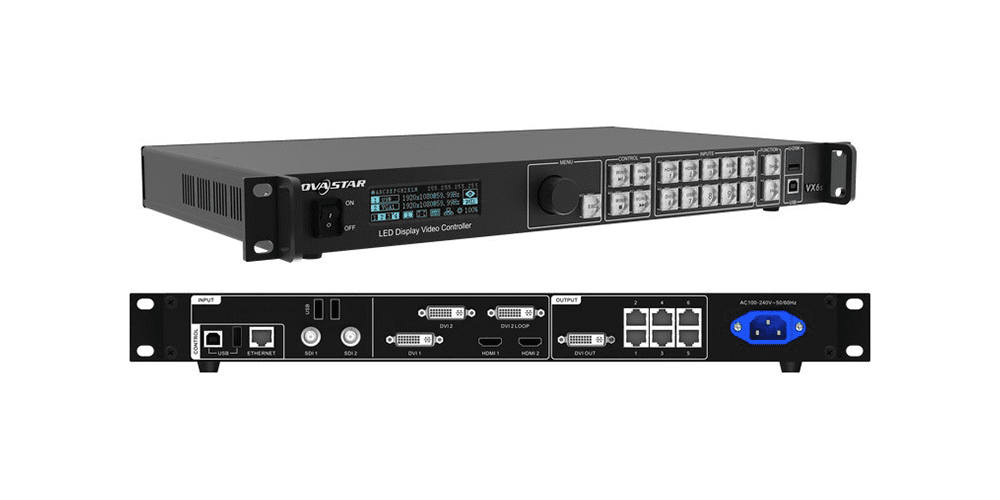
The NovaStar VX6s is a proven all-in-one LED video controller trusted by rental companies, AV integrators, and LED display professionals worldwide. Combining video processing and LED control in a single device, it offers an excellent balance of performance, reliability, and value.
In this guide, you’ll learn everything you need to know about the NovaStar VX6s, including its specifications, key features, setup procedures, NovaLCT configuration, troubleshooting tips, and whether it’s still worth buying in 2026.
Table of Content
1.NovaStar VX6s Overview
The NovaStar VX6s is one of the most widely used all-in-one LED video controllers in the LED display industry. By integrating a video processor and LED sending card into a single device, it simplifies system deployment while delivering reliable image processing and screen control.
Designed for rental events, corporate AV, churches, exhibitions, and fixed LED installations, the VX6s remains a popular choice for users seeking a balance between performance, flexibility, and affordability.
2.NovaStar VX6s Main Features
2.1 Multiple Video Inputs for Flexible Connectivity
The VX6s supports a wide range of video sources, allowing users to connect cameras, laptops, media servers, and broadcast equipment simultaneously.
| Input Type | Quantity | Max Resolution |
| HDMI 1.3 | 2 | 1920×1200@60Hz |
| DVI | 2 | 1920×1200@60Hz* |
| 3G-SDI | 2 | 1920×1080@60Hz |
| USB 2.0 | 2 | Media playback & device connection |
In Direct Mode, DVI supports up to 3840×648@60Hz.
This versatile input configuration is particularly useful for live productions, where multiple signal sources need to be switched quickly and reliably.
2.2 Six Gigabit Ethernet Outputs
The VX6s provides six Gigabit Ethernet outputs with a total loading capacity of up to 3.9 million pixels, making it suitable for medium and large LED display projects.
Key benefits include:
- Supports large LED video walls
- Stable long-distance data transmission
- Compatible with Cat5e and Cat6 network cables
Simplifies cabinet connection and screen configuration
For most rental LED displays and conference room installations, the VX6s provides more than enough capacity without requiring additional sending devices.
2.3 Three Independent Layers
The VX6s supports up to three independent image layers plus one OSD layer, allowing operators to display multiple content sources on a single screen.
Typical applications include:
- Full-screen background video
- Picture-in-picture camera feeds
- Company logos and branding elements
- Event countdown timers
Each layer can be freely resized, repositioned, and scaled for maximum creative flexibility.
2.4 Seamless Switching and Transition Effects
Smooth source switching is essential for professional presentations and live events.
The VX6s supports:
- Seamless source switching
- Fade-in and fade-out effects
- Black-screen transitions
- Stable signal switching without screen flashing
These features help create a more polished viewing experience during conferences, stage productions, and live broadcasts.
2.5 Direct Mode and Switcher Mode
The VX6s offers two operating modes to accommodate different production requirements.
Direct Mode
- Instant source switching
- Simple operation
- Ideal for fixed installations and everyday display applications
Switcher Mode
- Preview-before-output workflow
- Supports professional live-event operation
- Reduces switching errors during productions
This flexibility allows users to adapt the controller to both simple and complex workflows.
2.6 Preset Storage for Faster Setup
To simplify operation, the VX6s can store up to 16 user presets.
Each preset can save:
- Input source selection
- Layer layouts
- Scaling parameters
- Brightness settings
- Screen configuration
For rental companies and event organizers, this significantly reduces setup time when deploying the same LED display configuration repeatedly.
3.NovaStar VX6s Specifications
3.1 NovaStar VX6s Specifications
| Specification | NovaStar VX6s |
| Loading Capacity | 3.9 Million Pixels |
| Ethernet Outputs | 6 × Gigabit Ethernet Ports |
| Maximum Width | 4096 Pixels |
| Maximum Height | 4096 Pixels |
| Independent Layers | 3 + 1 OSD |
| User Presets | 16 |
| Power Consumption | 65W |
| Dimensions | 483.6 × 276.4 × 51.4 mm |
| Rack Size | Standard 19-inch 1U |
| Net Weight | 2.71 kg |
For most medium-sized LED display projects, the VX6s provides sufficient loading capacity without requiring additional sending devices, helping reduce both system complexity and deployment costs.
3.2 Input Interfaces
The VX6s supports multiple video input formats, making it compatible with a wide range of professional and consumer video sources.
| Input Type | Quantity | Maximum Resolution |
| HDMI 1.3 | 2 | 1920×1200@60Hz |
| DVI | 2 | 1920×1200@60Hz* |
| 3G-SDI | 2 | 1920×1080@60Hz |
| USB 2.0 | 2 | Media Playback |
Supports up to 3840×648@60Hz in Direct Mode.
These input options allow users to connect laptops, cameras, media servers, switchers, and broadcasting equipment simultaneously, making the VX6s highly adaptable for live events and multi-source presentations.
3.3 Output Interfaces
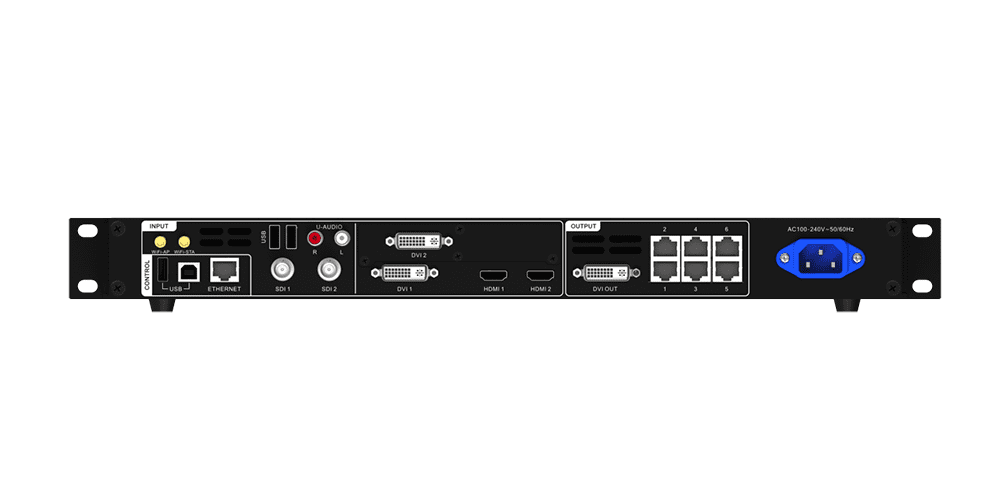
The controller features six Gigabit Ethernet outputs for driving LED cabinets and one DVI monitoring output for preview and program monitoring.
Key output features include:
- 6 × Gigabit Ethernet ports for LED screen data transmission
- Supports up to 3.9 million pixels
- DVI monitor output for PVW/PGM monitoring
- Compatible with NovaStar receiving cards
- Stable long-distance transmission over Cat5e/Cat6 cables
This output architecture enables reliable control of medium-to-large LED video walls while maintaining straightforward system wiring.
3.4 Physical Specifications and Operating Environment
The NovaStar VX6s is designed for professional installations and long-term operation in various indoor environments.
- Power Supply: AC 100V–240V, 50/60Hz
- Operating Temperature: 0°C to +45°C
- Storage Temperature: -20°C to +60°C
- Installation Type: Rack-mounted or standalone
- Cooling System: Intelligent active cooling
The controller also complies with major international certifications, including CE, RoHS, FCC, UL, CB, KC, RCM, IC, and EAC, ensuring reliable performance and global deployment compatibility.
4.How to Set Up the NovaStar VX6s
4.1 Before You Begin
- LED screen assembled and receiving cards installed
- `.rcfgx` configuration files saved
- All cables verified
- NovaLCT installed on control PC (download from novastar.tech)
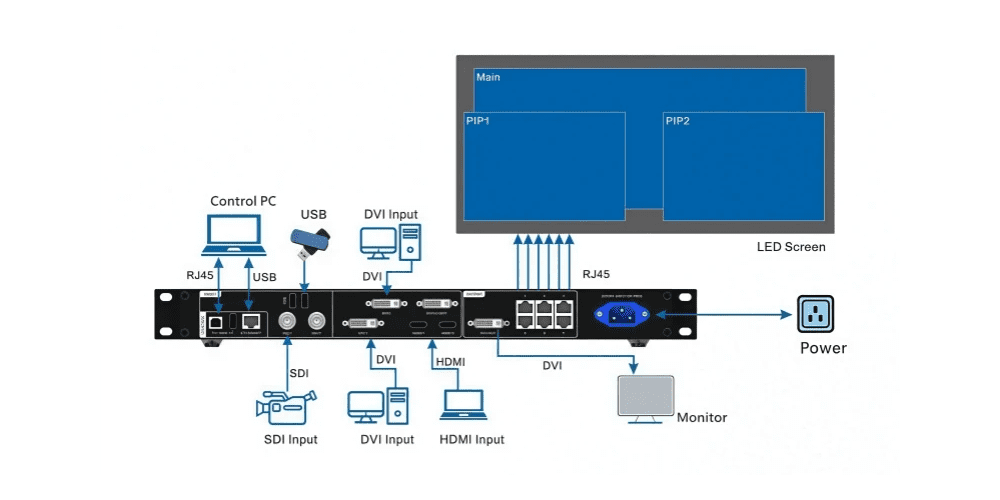
4.2 Hardware Connections
Video sources: Plug laptops (HDMI), media servers (HDMI/DVI), and cameras (3G-SDI) into rear-panel inputs.
LED cabinets: Run Cat5e/Cat6 from VX6s Ethernet ports to the first receiving card in each daisy-chain.
Monitoring: Attach a DVI monitor to the Monitor Output for PVW/PGM confidence monitoring.
4.3 Quick Configuration Guide
| Step | Operation |
| 1 | Power on the NovaStar VX6s and wait for the home screen to appear |
| 2 | Press the control knob and enter Quick Configuration |
| 3 | Set the number of cabinet rows and columns |
| 4 | Assign cabinets to each Ethernet output |
| 5 | Configure the screen data flow direction |
| 6 | Preview the layout and confirm the mapping |
| 7 | Save the configuration and apply the settings |
5.NovaLCT Configuration Guide
5.1 Connecting to NovaLCT
USB:Connect NovaStar VX6s to PC via USB. NovaLCT auto-detects. Network: Connect both to the same LAN via the ENET port.
5.2 Screen Mapping
Go to Screen Configuration → Screen Connection Tab. Enter cabinet matrix, total columns/rows, assign each Ethernet port to its cabinets in daisy-chain order. Final shape must be a rectangle. Click Send to Hardware → Save.
5.3 Brightness & Input Resolution
Adjust brightness manually or set auto-adjustment by ambient light sensor or schedule. Set each input resolution to match the source (typically 1920×1080@60Hz, 8-bit). Mismatched resolutions cause scaling artifacts.
5.4 Saving Configuration Files
Export `.rcfgx` (receiving card config) and `.scr` (screen connection) after every change. Store copies on shared drive, USB, and email. These files restore your full setup in seconds.
6.Common VX6s Operating Functions
6.1 Window Settings
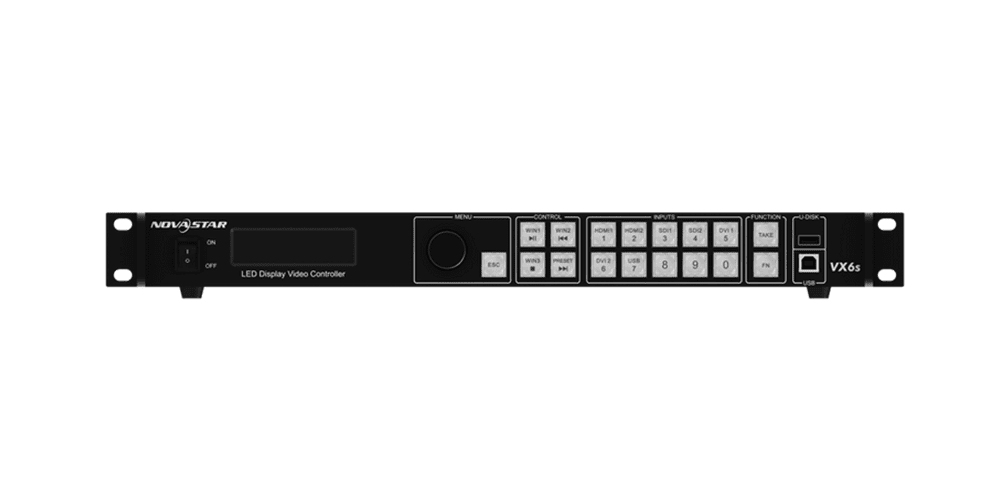
Create, resize, and position up to 3 windows via NovaLCT or front panel. Layer priority (z-order) controls stacking. Use the OSD layer for permanent overlays.
6.2 Screen Brightness & Presets
Lower brightness indoors to reduce power and extend LED life; increase for outdoor use. Save up to 16 presets named by venue or event — recall from NovaLCT, VICP app, or front panel.
6.3 Switching Between Sources
Press dedicated source buttons (HDMI, SDI, DVI, USB) for immediate switching. In Switcher Mode, preview on the DVI monitor first, then press TAKE — best practice for live events.
7. NovaStar VX6s vs VX600: What’s the Difference?
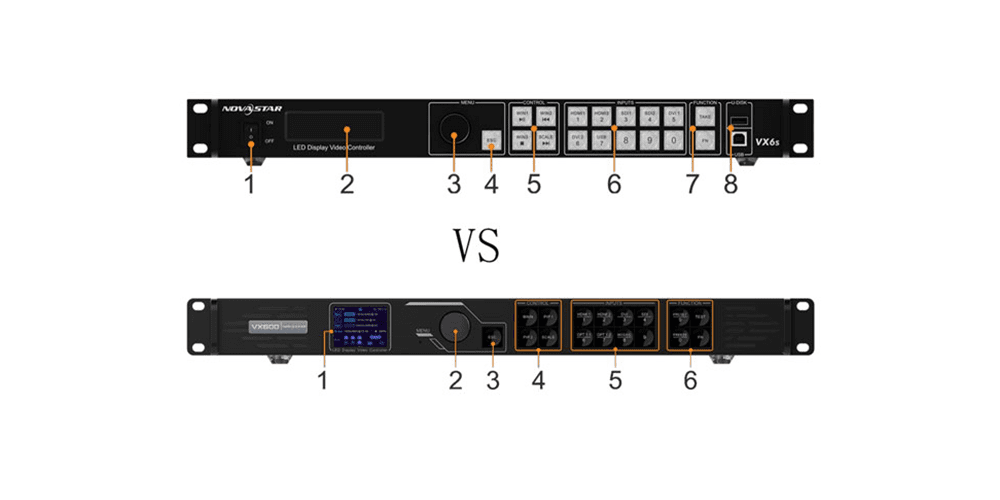
Both the NovaStar VX6s and NovaStar VX600 are all-in-one LED video controllers that combine a video processor and sending card in a single device.
However, the VX600 is the newer-generation model, offering higher loading capacity, improved video processing, and more advanced connectivity. The VX6s remains a popular choice for budget-conscious projects, while the VX600 is better suited for higher-resolution LED displays and modern event applications.
| Feature | NovaStar VX6s | NovaStar VX600 | Best For |
| Product Generation | Classic VX Series | New-generation VX Series | Future-proof projects |
| Loading Capacity | 3.9 Million Pixels | 3.9 Million Pixels | Similar screen sizes |
| Ethernet Outputs | 6 × Gigabit Ports | 6 × Gigabit Ports | Medium-sized LED walls |
| Video Inputs | HDMI, DVI, VGA, SDI | HDMI 1.3, HDMI 1.4, DVI | Modern video sources |
| Layer Support | 3 Layers + 1 OSD | Up to 6 Layers | Multi-window displays |
| Seamless Switching | Yes | Yes | Live events |
| Scaling Performance | Standard FPGA Processing | Enhanced Image Processing | Higher-quality visuals |
| Control Software | NovaLCT | NovaLCT | Easy configuration |
| Operating Interface | LCD + Knob Control | Improved UI & Workflow | Faster setup |
| Typical Applications | Churches, conferences, exhibitions, rental screens | Corporate events, broadcast, rental LED displays, fine-pitch LED screens | Depends on project complexity |
| Price Level | Lower | Higher | Budget vs Performance |
8.Best LED Displays for the NovaStar VX6s
8.1 Rental LED Displays
For rental LED setups, the key priorities are fast installation, high refresh rate, stable grayscale, and flexible curvature support. The VX6s performs best with mid-to-fine pixel pitch rental cabinets.
Recommended:
EagerLED EA500H9 Series Rental LED display
A high-performance rental cabinet designed for quick-lock installation, curved configuration support, and stable output for live events. Ideal for concerts, exhibitions, and touring stages where camera capture is required.
8.2 Indoor LED Displays
For indoor environments, the focus is high resolution, close viewing distance, and color uniformity. The VX6s can comfortably drive fine-pitch indoor walls for corporate, retail, and broadcast use.
Recommended:
A front-service indoor LED display with a 4:3 design, suitable for meeting rooms, control centers, and fixed installations requiring seamless image quality.
(2)EA250WH5 EA250WH5 Indoor LED Display Wall
Ultra-slim wallpaper-style LED display designed for architectural integration, retail branding walls, and creative indoor installations where aesthetics matter as much as resolution.
8.3 Outdoor LED Displays
Outdoor LED systems paired with the VX6s should prioritize brightness (≥5000 nits), IP65 protection, and wider pixel pitches optimized for distance viewing.
Recommended pixel pitches and screen sizes:
Small outdoor displays (close viewing, 3–10m):P3.9 / P4.8
Suitable for storefronts, event backdrops, and medium outdoor advertising walls.
Medium outdoor displays (10–30m):P5 / P6.25
Ideal for stage LED walls, public squares, and rental outdoor events.
Large-format billboards (30m+):P8 / P10
Best for stadiums, highway advertising, and high-elevation signage where long-distance visibility is key.
9.FAQs
9.1 What is the loading capacity of the NovaStar VX6s?
3.9 million pixels across 6 Gigabit Ethernet ports (~650K per port). Max resolution: 4096×4096.
9.2 Does the VX6s support SDI input?
Yes, two 3G-SDI inputs up to 1920×1080@60Hz. SDI1 supports de-interlacing.
9.3 Can multiple NovaStar VX6s units be cascaded?
Yes, via USB Type-A (output) to USB Type-B (input).
9.4 Which receiving cards work with VX6s?
NovaStar A5s, A7s, A8s, A10s, MRV series, and most standard NovaStar receiving cards.
9.5 Is the NovaStar VX6s suitable for rental?
Yes — 16 presets, 7 inputs, DVI preview, and front-panel Quick Config make it a strong rental choice.
9.6 Does it support seamless switching?
Yes — seamless cuts and fade-to-black in Switcher Mode.
9.7 What software is used?
NovaLCT (configuration), V-Can (remote control), VICP app (mobile adjustments).
9.8 Is the NovaStar VX6s discontinued?
Some resellers list it discontinued in favor of VX600, but it remains widely available, fully software-supported, and actively deployed worldwide.
9.9 Where to Download the NovaStar VX6s Manual
10.Conclusion
The NovaStar VX6s earns its reputation as a workhorse mid-range controller. With 7 flexible inputs, 3.9M pixel capacity, and a front panel that technicians actually enjoy using, it delivers everything most mid-size LED projects need — without the premium of higher-capacity models. For rental companies, churches, corporate integrators, and event producers running walls under 3.9 million pixels at 1080p, the VX6s remains a solid, proven choice in 2026.
The VX6s is available through authorized distributors including EagerLED.