
2026-10-27T13:29:34+00:00October 27, 2026|
2026-10-27T13:23:03+00:00October 27, 2026|
2026-10-27T13:12:56+00:00October 27, 2026|
An LED display resolution calculator converts active screen width, height, and pixel pitch into horizontal pixels, vertical pixels, and total pixel load. Divide each dimension in millimeters by the pitch in millimeters, then multiply the two pixel counts. For example, a 4.8 m × 2.7 m wall at an exact 2.5 mm pitch is 1,920 × 1,080 pixels. The arithmetic is simple; choosing buildable cabinet dimensions and a compatible controller takes another check. This guide explains the formulas, practical examples, aspect ratios, and loading limits so you can turn a proposed screen size into a usable specification.
Table of Contents
- 1. LED Display Resolution Calculator: Formula Box
- 2. Width Pixels: Calculate the Horizontal Matrix
- 3. Height Pixels: Calculate Rows and Buildable Size
- 4. Aspect Ratio: Match the Wall to the Content
- 5. Worked Examples: From Dimensions to Pixels
- 6. LED Display Resolution Calculator Lookup Table
- 7. Controller Load: Check More Than Megapixels
- 8. Translate Resolution Into a Buying Specification
- 9. Common Calculation Mistakes
- 10. FAQ
- 11. Conclusion
1. LED Display Resolution Calculator: Formula Box
1.1 The four calculations you need
Use this LED display resolution calculator method for a rectangular, direct-view LED wall with equal horizontal and vertical pitch. Measure the active image area, excluding trim, supporting steel, and decorative borders. If the pitch differs between axes, calculate each axis with its corresponding pitch.
Width pixels = active width (mm) ÷ horizontal pitch (mm)
Height pixels = active height (mm) ÷ vertical pitch (mm)
Total pixels = width pixels × height pixels
Aspect ratio = width pixels : height pixels, reduced to simplest terms
For meters: pixels = dimension (m) × 1,000 ÷ pitch (mm)
For feet: pixels = dimension (ft) × 304.8 ÷ pitch (mm)
The LED display resolution calculator output is the screen’s native pixel matrix. A processor accepting a 4K video input does not make a lower-resolution LED wall a native 4K display. Scaling can fit an image to the available pixels, but it cannot create additional physical pixels.
1.2 What pixel pitch means
Pixel pitch is the center-to-center distance between adjacent pixels, normally expressed in millimeters. Planar’s explanation of pixel pitch connects smaller pitch with higher pixel density and closer viewing. At the same active size, halving pitch doubles both pixel dimensions and quadruples the total pixel count.
An LED display resolution calculator should distinguish an estimate from a cabinet-confirmed result. A decimal answer such as 1,279.6 pixels is a warning to verify the exact pitch and module matrix. Installed screens contain whole pixels; rounding the estimate alone does not prove that the cabinet arrangement exists.
2. Width Pixels: Calculate the Horizontal Matrix
2.1 Convert width before dividing
Width pixels count the physical pixel columns across the image. For a wall 6 m wide at an exact 2.5 mm pitch, convert 6 m to 6,000 mm, then divide: 6,000 ÷ 2.5 = 2,400 columns. Entering 6 ÷ 2.5 mixes meters and millimeters and produces an answer smaller by a factor of 1,000.
Use the same units in every LED display resolution calculator input. Keep original measurements beside converted values, particularly when drawings use feet and cabinet datasheets use millimeters. Do not include a mounting frame in the display width simply because it appears in the overall architectural dimension.
2.2 Confirm width with cabinet columns
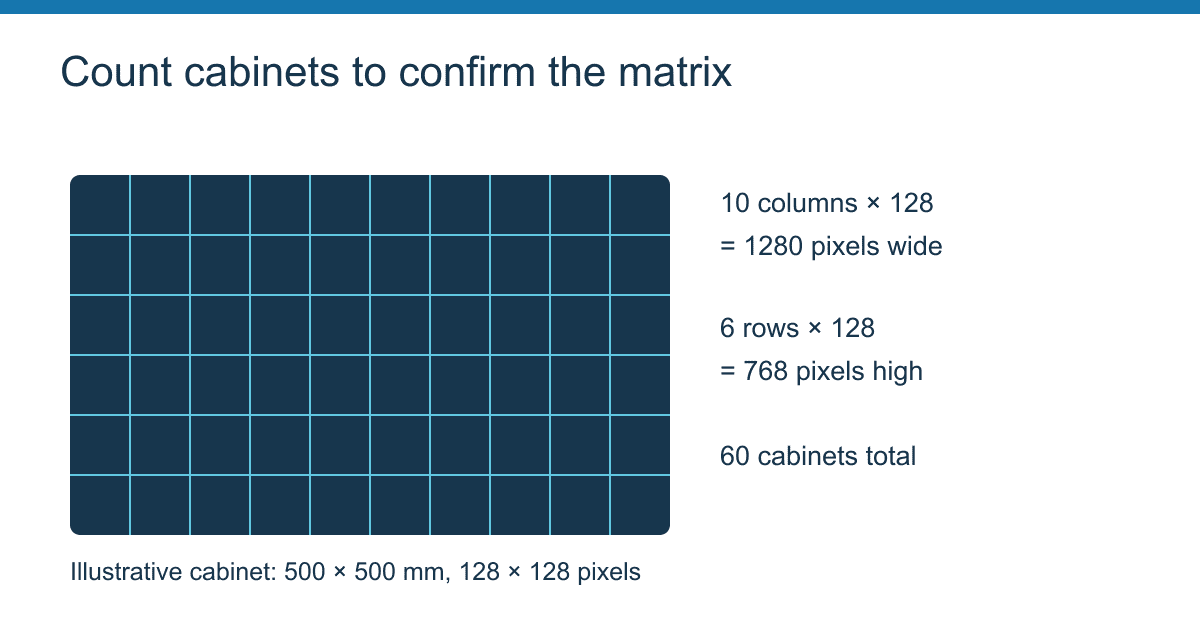
For a buildable design, cross-check the LED display resolution calculator against the cabinet matrix: cabinet columns × pixels per cabinet width. If a specified 500 mm cabinet has 128 pixel columns, ten cabinets across provide 1,280 horizontal pixels and an active width of 5,000 mm, assuming the cabinet width is fully active.
That cabinet’s implied pitch is 500 ÷ 128 = 3.90625 mm. A product marketed as P3.91 may use this matrix. Dividing 5,000 by the rounded label 3.91 gives approximately 1,278.8 pixels, which is not the cabinet-confirmed resolution. Use the manufacturer’s actual matrix as the decisive input.
An LED display resolution calculator is most useful when it lets you cross-check both methods. If the width-derived result and cabinet-derived result disagree, resolve the discrepancy before preparing media files or assigning output ports.
3. Height Pixels: Calculate Rows and Buildable Size
3.1 Height is an independent input
Height pixels count the rows from the top to the bottom of the active screen. At an exact 2.5 mm pitch, a 3 m active height gives 3,000 ÷ 2.5 = 1,200 rows. Combined with the 6 m width above, the native matrix is 2,400 × 1,200, totaling 2,880,000 pixels.
Do not automatically select 1,080 rows because the content is Full HD. An LED display resolution calculator derives the output from the physical wall; the incoming video format is a separate specification. The content may need scaling, cropping, or a different layout.
3.2 Whole cabinets determine the final height
Calculate cabinet rows × pixels per cabinet height. For a specified 500 × 500 mm cabinet containing 128 × 128 pixels, six rows provide 768 vertical pixels and 3 m active height. Ten columns and six rows therefore form a 1,280 × 768 wall with a 5:3 aspect ratio.
An LED display resolution calculator cannot turn a fraction of a cabinet into a standard stock component. If the site requires a maximum height of 2.8 m, six 500 mm rows will not fit. Five rows fit within 2.5 m, while a different cabinet family may achieve a closer match. Compare the actual buildable alternatives before approving the structure.
Check drawings for active dimensions, external enclosure dimensions, service clearances, and mounting tolerances. These dimensions answer different questions. The display matrix comes from the active modules, while the installation envelope determines whether the assembled system fits safely in its intended position.
4. Aspect Ratio: Match the Wall to the Content
4.1 Reduce width and height to a ratio
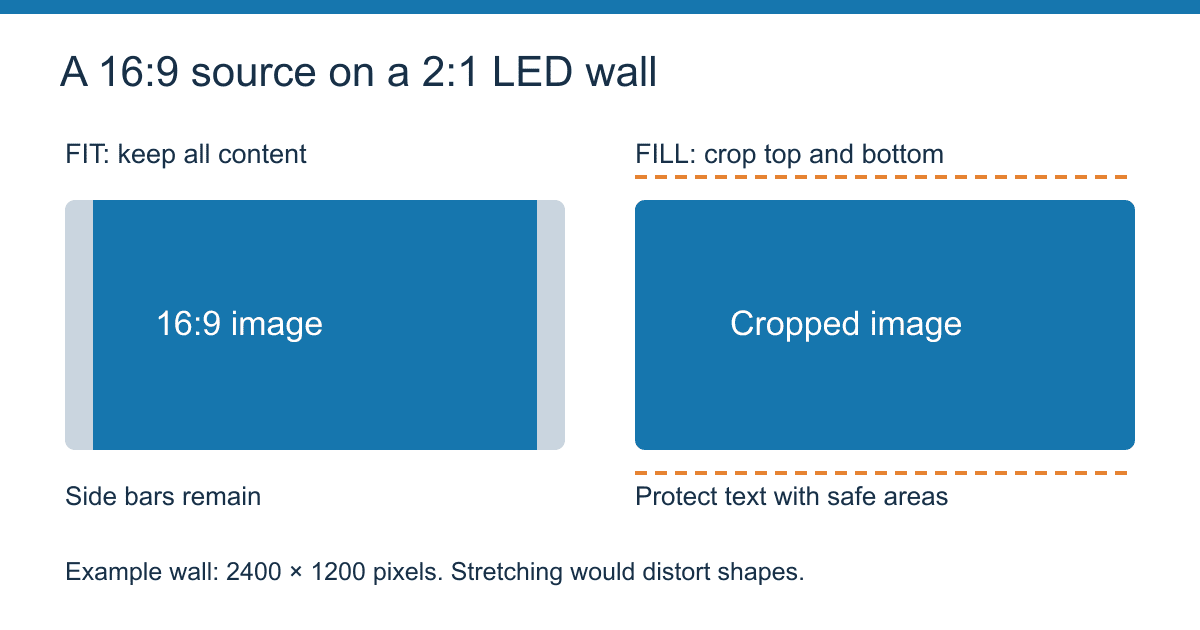
Aspect ratio describes image shape. Divide both pixel dimensions by their greatest common divisor: 1,920:1,080 reduces to 16:9; 2,400:1,200 reduces to 2:1; and 1,280:768 reduces to 5:3. For a regular wall with square pixels, the active physical ratio and native pixel ratio match.
An LED display resolution calculator should show the exact ratio alongside a decimal, such as 1.7778 for 16:9. A wall can have millions of pixels and still be the wrong shape for a standard presentation. Pixel quantity and image proportions solve different problems.
4.2 Choose fitting, cropping, or a custom canvas
For 16:9 content on a 2,400 × 1,200 wall, preserving the full image at 1,200 pixels high produces a content width of about 2,133 pixels. Approximately 267 columns remain for side bars in total. Filling the entire width instead produces a 1,350-pixel-high image, requiring roughly 150 rows of vertical cropping.
| Content treatment | What happens | Suitable use |
|---|---|---|
| Fit with aspect ratio preserved | Entire image remains visible; unused space becomes bars | Slides, logos, and information that must remain intact |
| Fill with cropping | Screen is filled; some source image is removed | Video composed with safe areas |
| Stretch | Width and height scale differently; shapes distort | Only where distortion is explicitly acceptable |
| Native custom canvas | Artwork is composed for the exact wall matrix | Signage, dashboards, and panoramic stage graphics |
Use your LED display resolution calculator result as the media team’s canvas specification. Include width, height, frame rate, safe areas, and intended scaling mode in the same handover. A one-pixel border, circular test graphic, and labeled corners quickly reveal overscan, stretching, or incorrect mapping.
5. Worked Examples: From Dimensions to Pixels
5.1 Example A: A Full HD indoor wall
Assume a specified cabinet is 600 × 337.5 mm with a 240 × 135 pixel matrix at an exact 2.5 mm pitch. An eight-column by eight-row arrangement creates a 4,800 × 2,700 mm active wall. The cabinet calculation gives 8 × 240 = 1,920 width pixels and 8 × 135 = 1,080 height pixels.
The LED display resolution calculator gives the same result: 4,800 ÷ 2.5 = 1,920 and 2,700 ÷ 2.5 = 1,080. Total load is 2,073,600 pixels, or approximately 2.074 megapixels. Its 16:9 geometry matches Full HD without changing proportions.
These are illustrative cabinet specifications, not a claim that every P2.5 product uses this enclosure. Confirm the selected product’s actual dimensions, matrix, receiving card, and service requirements. A resolution match is one part of the design, not proof of complete system compatibility.
5.2 Example B: A rental wall using rounded pitch
Assume ten columns and six rows of 500 × 500 mm cabinets, each specified as 128 × 128 pixels. The wall measures 5 × 3 m and contains 60 cabinets. Its resolution is 1,280 × 768, and the total load is 983,040 pixels.
In an LED display resolution calculator, entering the exact pitch of 3.90625 mm reproduces the matrix. Entering the commercial label P3.91 produces a slightly different estimate. The correction is to use the actual cabinet resolution, not to force the estimate to the nearest familiar video standard.
For this wall, prepare a 1,280 × 768 canvas when the playback chain supports it, or define how another source format maps into that canvas. Send the same cabinet layout to the technician responsible for receiver configuration, so the creative file and physical mapping describe the same screen.
5.3 Example C: Same size, four times the load
Consider an idealized 6 × 3 m active wall. At exactly 5 mm pitch, it contains 1,200 × 600 = 720,000 pixels. At exactly 2.5 mm pitch, it contains 2,400 × 1,200 = 2,880,000 pixels. The active area remains 18 square meters, but the pixel load increases fourfold.
This LED display resolution calculator comparison explains why area alone is insufficient for controller selection. It also explains why a quotation based only on square meters can hide important differences. Compare native matrix, processing requirements, and the intended viewing distance before comparing total prices.
6. LED Display Resolution Calculator Lookup Table
The table below uses an idealized 6,000 × 3,000 mm active rectangle and exact pitch values. Results are arithmetic references, not guarantees that a particular cabinet product can build those dimensions. All entries have a 2:1 aspect ratio, making pitch changes easy to compare without changing screen shape.
| Exact pitch | Width pixels | Height pixels | Total pixels | Megapixels |
|---|---|---|---|---|
| 1.25 mm | 4,800 | 2,400 | 11,520,000 | 11.520 |
| 1.5 mm | 4,000 | 2,000 | 8,000,000 | 8.000 |
| 2 mm | 3,000 | 1,500 | 4,500,000 | 4.500 |
| 2.5 mm | 2,400 | 1,200 | 2,880,000 | 2.880 |
| 3 mm | 2,000 | 1,000 | 2,000,000 | 2.000 |
| 4 mm | 1,500 | 750 | 1,125,000 | 1.125 |
| 5 mm | 1,200 | 600 | 720,000 | 0.720 |
| 6 mm | 1,000 | 500 | 500,000 | 0.500 |
| 10 mm | 600 | 300 | 180,000 | 0.180 |
To adapt this LED display resolution calculator table, recompute both axes for your dimensions. Do not scale total pixels by width alone if height also changes. Doubling both dimensions at the same pitch quadruples pixel count; doubling only width doubles it.
Pixel density provides another way to check an LED display resolution calculator: pixels per square meter = (1,000 ÷ pitch in mm)² for equal pitch in both directions. At 2.5 mm, density is 160,000 pixels/m². Multiplying by 18 m² gives 2,880,000 pixels, providing an independent check on the table.
7. Controller Load: Check More Than Megapixels
7.1 Start with total active pixels
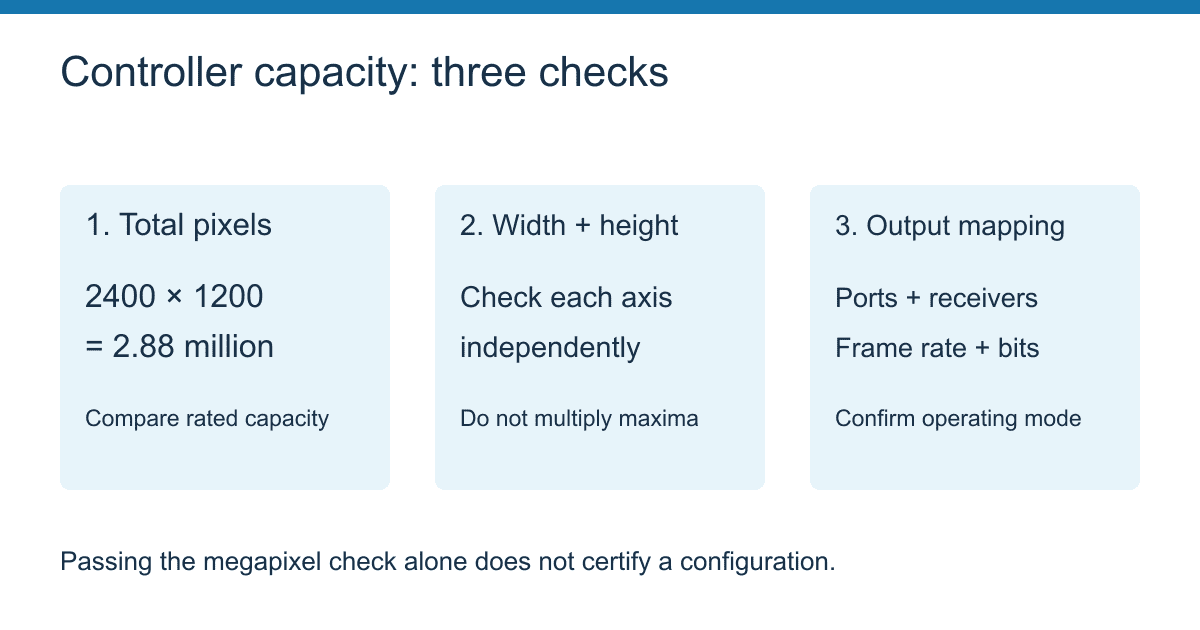
Controller load is the number of pixels assigned to a controller or output under its specified operating conditions. Multiply width pixels by height pixels, then compare that load with the exact controller model’s documented capacity. An LED display resolution calculator establishes the demand; the controller documentation establishes the permitted configuration.
NovaStar’s official VX Pro comparison lists the VX600 Pro at 3.9 million pixels, with maximum width of 10,240 pixels and maximum height of 8,192 pixels. These are separate limits. They do not mean the controller can drive a 10,240 × 8,192 screen, which would contain 83,886,080 pixels.
For the 2,400 × 1,200 example, a 3.9-million-pixel capacity gives nominal utilization of 2,880,000 ÷ 3,900,000 × 100 = approximately 73.8%. This passes the total-pixel comparison, but output mapping and operating mode still require validation. Spare capacity is a planning allowance, not a universal manufacturer-mandated percentage.
7.2 Verify ports, receiver limits, and signal settings
Do not divide the LED display resolution calculator total by a generic port capacity and stop. Confirm each output’s permitted load for the selected frame rate, bit depth, receiver hardware, and cabinet configuration. Higher data requirements can change the supported load, and different controller families implement mapping differently.
For an illustrative system where the verified port limit is 650,000 pixels, the arithmetic lower bound for 2,880,000 pixels is ceiling(2,880,000 ÷ 650,000) = five ports. A convenient six-strip arrangement would assign 400 × 1,200 = 480,000 pixels to each port. That layout works only if cabinet boundaries and the selected controller permit those strips.
An LED display resolution calculator cannot certify a wiring diagram. A port total below the nominal limit may still violate a receiver’s width, height, scan, or mapping restrictions. Also check redundancy: a backup path does not automatically add usable capacity to the primary screen.
7.3 Separate input resolution from output capacity
NovaStar’s VX Pro page describes 4K input support while listing different output pixel capacities across the series. A product can accept a high-resolution source and scale it to a smaller native wall. Conversely, a wide custom wall may need a particular input timing, multiple sources, or several synchronized outputs.
Use the LED display resolution calculator report to request written confirmation of the complete signal path: player output, processor input, scaling mode, output mapping, receiving cards, and final matrix. For camera-facing installations, LED refresh behavior and source frame rate also need testing; neither can be inferred from spatial resolution alone. Brompton Technology’s ShutterSync overview explains why camera synchronization is a separate concern.
8. Translate Resolution Into a Buying Specification
8.1 Balance detail, viewing distance, and budget
An LED display resolution calculator measures pixel quantity, not whether a viewer can comfortably read your content. Small spreadsheet text at close range is more demanding than large advertising graphics viewed across a road. Evaluate the smallest required characters using actual artwork at the nearest intended viewing position.
Planar’s viewing-distance guidance presents several estimation methods and explains that comfortable viewing is subjective. Use such guidance to shortlist pitches, then compare a demonstration or sample. Avoid presenting one pitch-to-distance ratio as a guarantee for all viewers and content.
Once the matrix is confirmed, use the site’s LED wall cost calculator to explore a budget and the LED display installation cost guide to consider installation-related expenses. Keep screen hardware, controller, structure, cabling, access, and commissioning visible as separate quotation items.
8.2 Send suppliers a consistent checklist
Turn your LED display resolution calculator result into a short technical brief. Comparable quotations should describe the same active size and native matrix, rather than simply using labels such as “HD screen” or “4K compatible.” Ask each supplier to identify any departure from the brief.
- State active width and height, installation envelope, and intended viewing positions.
- Identify exact pitch, cabinet dimensions, cabinet pixel matrix, and column-by-row arrangement.
- Record width pixels, height pixels, aspect ratio, total load, and intended content canvas.
- Specify controller model, operating frame rate, bit depth, receiver model, port allocation, and redundancy requirements.
- Request a mapping drawing and acceptance test using your actual content.
For a broader procurement workflow, use the LED display buying guide. The companion pixel pitch calculator guide can help during pitch selection. This article focuses on converting that choice into the exact pixel matrix and load you must verify.
9. Common Calculation Mistakes
9.1 Confusing RGB subpixels with full pixels
A color pixel may contain red, green, and blue light-emitting components. Count the full image pixels when specifying resolution; do not multiply the wall’s width × height by three because it uses RGB. A 1,920 × 1,080 matrix remains 2,073,600 image pixels.
9.2 Rounding away a cabinet mismatch
If an LED display resolution calculator shows fractional pixels, inspect the assumptions. Common causes include rounded pitch labels, approximate measurements, and a target dimension that does not correspond to whole modules. Document the revised physical dimensions after selecting a real cabinet matrix.
9.3 Treating a megapixel total as a complete specification
Two walls with the same total pixels can have different shapes, maximum-width requirements, and port layouts. A long ribbon display can exceed a controller’s width limit despite remaining below its total capacity. Preserve both axis outputs from your LED display resolution calculator throughout the specification.
Before signing off an LED display resolution calculator result, compare three records: the cabinet layout, the media canvas, and the controller mapping. Every record should describe the same native matrix. This simple reconciliation catches errors that a total-pixel number alone will miss.
10. FAQ
10.1 How do I calculate LED display resolution from size and pitch?
Divide active width and active height in millimeters by the exact pixel pitch in millimeters. Multiply the resulting width and height pixels for total load. An LED display resolution calculator should also show aspect ratio and flag fractional results for cabinet verification. Confirm the final matrix using cabinet columns and rows.
10.2 How large must a P2.5 wall be for native 1920 × 1080?
Reverse the LED display resolution calculator formula: at exactly 2.5 mm pitch, multiply 1,920 and 1,080 by 2.5. The active dimensions are 4,800 × 2,700 mm, or 4.8 × 2.7 m. This is a mathematical target; the chosen cabinet family must support that arrangement. At the same pitch, native 3,840 × 2,160 requires 9.6 × 5.4 m.
10.3 Why does P3.91 give a different result from my cabinet datasheet?
P3.91 may be a rounded commercial label. A specified 500 mm cabinet with 128 pixels across has an exact implied pitch of 3.90625 mm. Use the cabinet matrix for the installed resolution. An LED display resolution calculator using the rounded label gives an estimate, which should not override a verified datasheet.
10.4 Does a 4K controller make the LED wall 4K?
No. Native resolution depends on the wall’s physical pixel matrix. A controller may accept a 4K source and scale it onto fewer pixels. Verify input support and output loading separately using the exact model documentation, including frame rate, bit depth, output dimensions, and mapping restrictions.
10.5 Can I select a controller from total pixel count alone?
No. The LED display resolution calculator total is the first check. You must also verify maximum width and height, per-port loading, receiving-card compatibility, operating mode, and backup requirements. A proposed layout is ready only when both the overall capacity and each mapped output satisfy the manufacturer’s specifications.
11. Conclusion
Use an LED display resolution calculator to establish width pixels, height pixels, aspect ratio, and total load before choosing a controller or preparing content. Convert units consistently, replace rounded pitch estimates with cabinet-confirmed matrices, and check every output against the selected operating conditions. The best handover combines the physical layout, native content canvas, and port map in one specification. Compare actual artwork at the intended viewing distance before committing to a finer pitch. For a project review, share your dimensions and cabinet requirements and request a documented resolution and controller configuration with the quotation.