
November 5, 2026|
November 5, 2026|
November 5, 2026|
The NovaStar VX600 combines video processing and LED sending functions. It has six Gigabit Ethernet outputs and a maximum total loading capacity of 3.9 million pixels. Its maximum output width is 10,240 pixels and maximum height is 8,192 pixels; these are separate limits, not a supported 10,240 by 8,192 screen.
What makes the VX600 stand out is its wide range of professional features, including fiber conversion, bypass working modes, output scaling, low latency, and pixel-level brightness/chroma calibration. These advanced tools allow it to deliver a seamless viewing experience, making it a favorite choice for concerts, live events, advertising billboards, and fixed installations.
This guide covers the VX600 connectors, loading limits, working modes, documentation and a pre-installation checklist. Specifications below were checked against the linked NovaStar VX600 Specifications V1.7.1, dated April 28, 2025.
Table of Contents
1.NovaStar VX600 Overview
The VX600 integrates video processing and a sending controller. Its video inputs include two HDMI 1.3 connectors, one DVI connector, one 3G-SDI connector and the self-adaptive OPT 1 fiber port. It does not have a DisplayPort input.
This all-in-one approach reduces the complexity of installation, lowers equipment costs, and increases reliability. Instead of having multiple devices connected with extra cables, the VX600 serves as a central hub that manages input, processing, and output simultaneously.
1.1 Front Panel
The front panel of the NovaStar VX600 is designed for ease of use and quick operation.
It features an LCD screen that clearly shows the device status, menu options, submenus, and real-time messages. A multifunction knob allows users to scroll through menu items, adjust parameter values, and press to confirm selections. In addition, an ESC button is provided to exit the current menu or cancel an operation instantly.
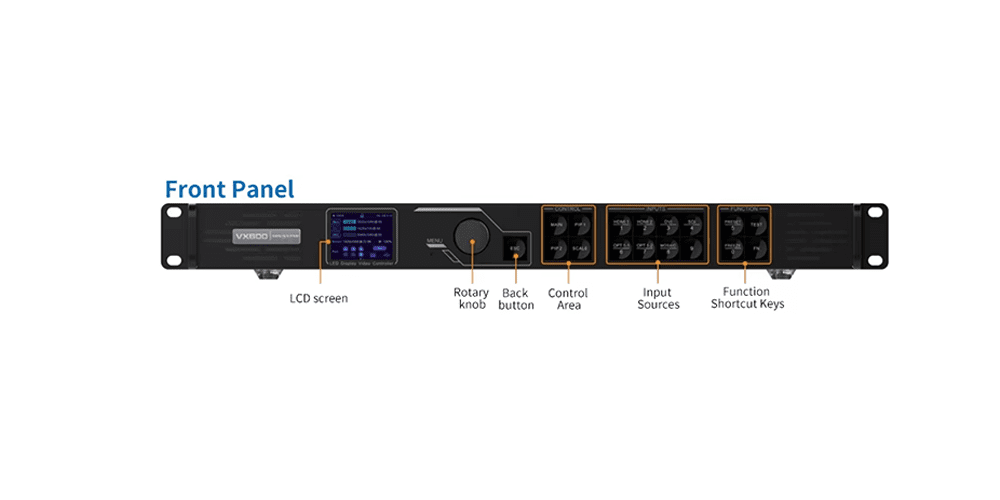
1.1.1 Home Screen of NovaStar VX600
The home screen is clean and user-friendly, displaying key information such as device name, IP address, input source and resolution, screen resolution, Ethernet port numbers with their status, sync status, and connection method. Shortcut buttons on the home screen provide quick access to commonly used features, saving time during setup and operation.
1.1.2 Menu Operations
The VX600 front panel supports a wide range of menu operations for device management. These include brightness adjustment, screen configuration, input and layer settings, preset management, image mosaic, display control, advanced settings, system setup, communication configuration, and factory reset.
The knob and ESC button make navigation simple and efficient, ensuring users can quickly configure the LED controller without needing extra tools or complex training.
1.2 Rear Panel
The rear panel of the NovaStar VX600 is designed as the central hub for all video input, output, and control connections, offering flexible options for diverse applications.
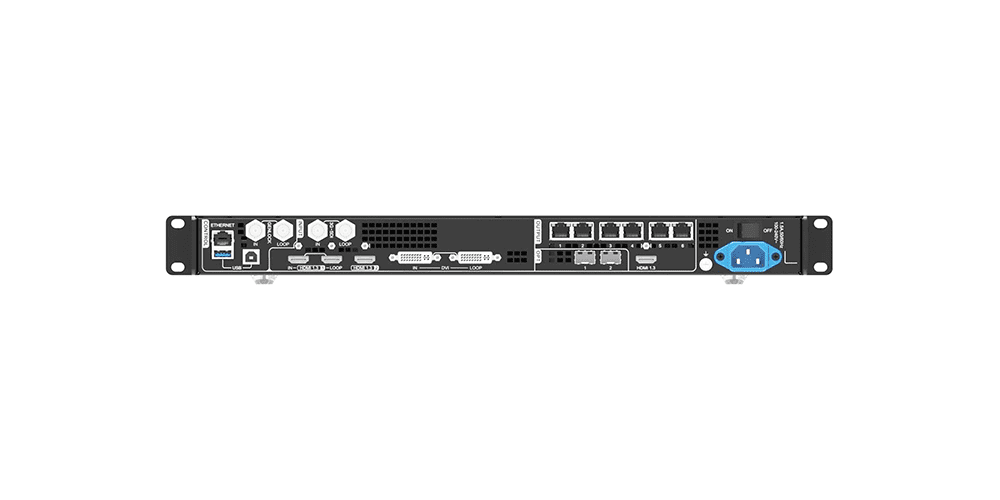
1.2.1 Input Connectors
The VX600 provides 3G-SDI, HDMI 1.3, and DVI inputs. HDMI and DVI support resolutions up to 1920×1200@60Hz, while 3G-SDI supports up to 1920×1080@60Hz with built-in deinterlacing. HDMI and DVI inputs also allow for custom resolutions and offer convenient loop-through outputs.
1.2.2 Output Connectors
Six Gigabit Ethernet outputs support up to 3.9 million pixels in total. Check total load, each port mapping and the separate width and height limits when designing a screen. Ports 1 and 2 support audio output through a compatible multifunction card.
1.2.3 Status Indicators
LED indicators provide clear visibility of the connection and communication status for each Ethernet port.
1.2.4 HDMI 1.3 Output
One dedicated HDMI output port is available for real-time monitoring and video output, with adjustable resolution options.
1.2.5 Optical Fiber Ports
The rear panel includes two fiber ports. OPT 1 is adaptive for both input and output, while OPT 2 is designed for output with copy and backup modes. Both ports support long-distance transmission over single-mode or multi-mode fiber.
1.2.6 Control Interfaces
For system control, the panel features one Ethernet port for PC or router connections, plus two USB ports for PC management and cascading multiple devices.
1.2.7 Additional Interfaces
The Genlock In/Loop ensures accurate synchronization with external signals, and a light sensor port allows automatic brightness adjustment based on ambient lighting.
2. VX600 Ordering and Compatibility Checklist
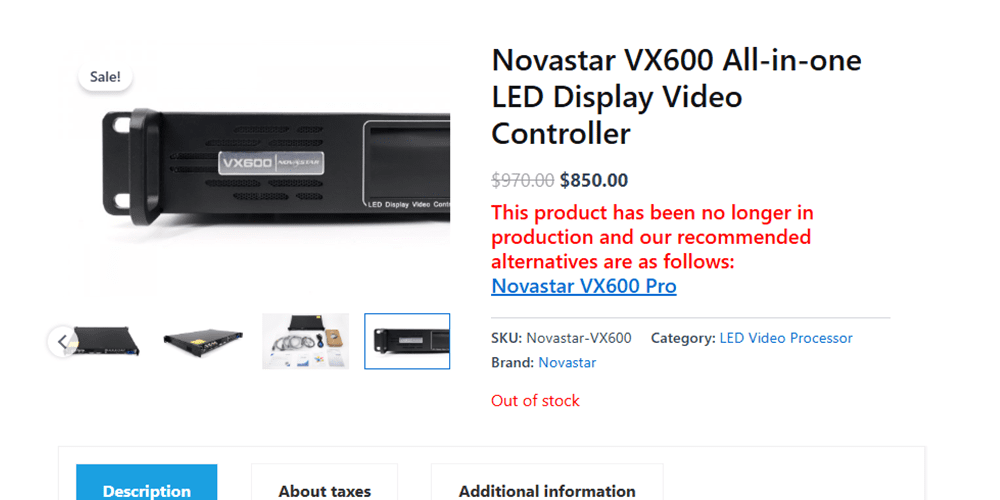
Before ordering a VX600, confirm the required accessories and support scope:
- Exact controller model and supported receiving cards
- Screen pixel dimensions and Ethernet-port allocation
- Compatible optical modules and fiber type, if used
- Local power connection, warranty and configuration support
Confirm product identity, documentation and firmware compatibility with the supplier. Keep a copy of the existing screen configuration before applying changes; a receiving-card file intended for another cabinet can produce an incorrect image.
For an event system, compare the controller requirements with the rental LED screen specifications and the actual source signal from the media server or laptop.
3.NovaStar VX600 User Manual Download
VX600 All-in-One Controller User Manual
VX600 All-in-One Controller Specifications
Quick Start: Confirm the Signal Path
- Record the cabinet arrangement, cabinet pixel dimensions, receiving-card model and total load.
- Connect a supported video input and verify its signal on the front-panel display.
- Back up the current configuration, then use the cabinet supplier’s verified settings in compatible NovaLCT software.
- Match the Ethernet mapping to the physical cabinet cable order; start at a safe brightness and check test patterns.
- Confirm scaling, layers, backup behavior and content playback before saving a preset.
For model selection and troubleshooting entry points, see our LED controller FAQs.
4.Key Features of NovaStar VX600
The VX600 is packed with professional-grade features that make it one of the best LED display controllers in its class. Let’s break them down in detail:
4.1 All-in-One Design
Combines video processor and sending card functions to reduce equipment costs and simplify setup.
4.2 High Pixel Loading Capacity
Supports up to 3.9 million pixels, ideal for large LED walls.
4.3 Output Dimension Limits
Maximum width: 10,240 pixels. Maximum height: 8,192 pixels. Maximum total load: 3.9 million pixels. A proposed screen must satisfy all three limits and the port mapping requirements.
4.4 Low Latency
The specification lists a delay of 20 lines when low latency and Bypass mode are both enabled. Cabinet alignment restrictions apply; in Bypass mode, low latency and Genlock cannot be enabled simultaneously. Check the manual before enabling these options.
4.5 Flexible Scaling
Built-in output scaling allows adjustment to match different LED screen sizes and aspect ratios.
4.6 Fiber Converter Support
Enables stable and long-distance signal transmission without quality loss.
4.7 Pixel-Level Calibration
Provides brightness and chroma calibration for consistent, vibrant images across the entire screen.
4.8 Multiple Inputs
HDMI 1.3 and DVI support a standard maximum input of 1920 x 1200 at 60 Hz; 3G-SDI supports 1920 x 1080 at 60 Hz. Custom timings and OPT 1 inputs have separate restrictions, so check the specification for the exact signal path.
4.9 Configuration Software
Use supported versions of NovaLCT and V-Can for screen configuration and controller operation. Find the relevant tools in our NovaStar software download guide.
4.10 Bypass Mode
Lets VX600 act only as a sending card while external processors handle video processing.
This rich feature set makes the VX600 adaptable for both fixed installation LED displays and rental LED events.
5.What Is the Maximum Resolution of VX600?
A VX600 can load up to 3,900,000 pixels. Multiply the screen pixel width by its pixel height, then check the separate maximum dimensions and Ethernet-port allocation.
For example, 1920 x 1080 = 2,073,600 pixels, which is within the total-load limit. A 3840 x 2160 UHD screen contains 8,294,400 pixels, so a single VX600 cannot drive that full pixel canvas. These calculations are capacity checks, not confirmation of every input format or cabinet mapping.
Use the LED pixel pitch calculator to estimate resolution from physical dimensions, then confirm the final cabinet layout with the supplier.
6.VX600 Working Modes
6.1 As a Video Controller
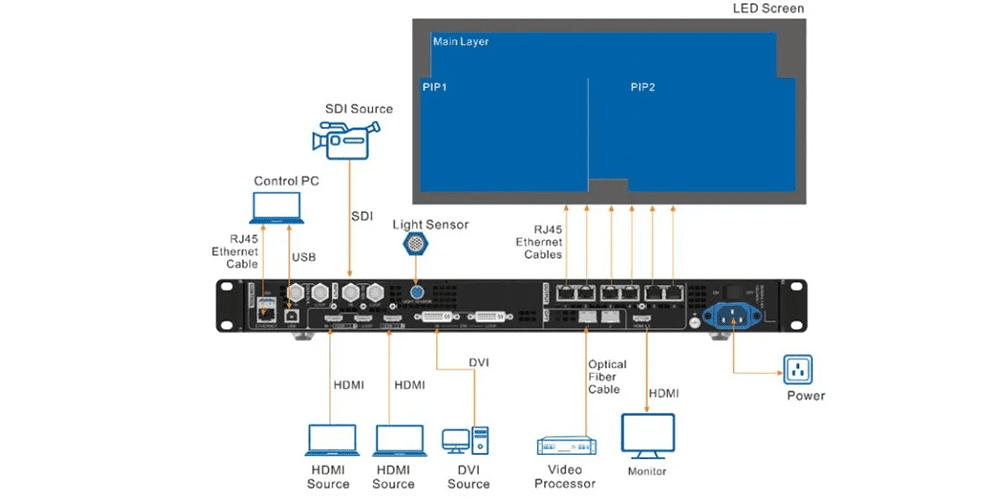
The VX600 processes input video, supports layer settings and scales output for the configured LED screen. The HDMI output supports monitoring or video output with adjustable resolution options described in the manual.
6.2 In Bypass Mode
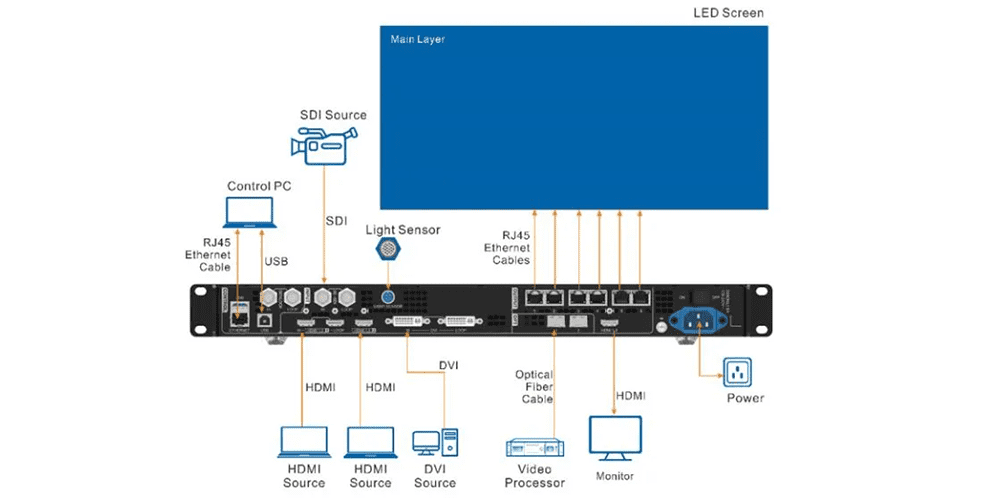
When working in ByPass mode, the VX600 functions purely as a sending card, keeping the output image pixel-to-pixel without scaling. In this mode, only the main layer is active, and the two PIP (Picture-in-Picture) layers are disabled.
6.3 As a Fiber Converter
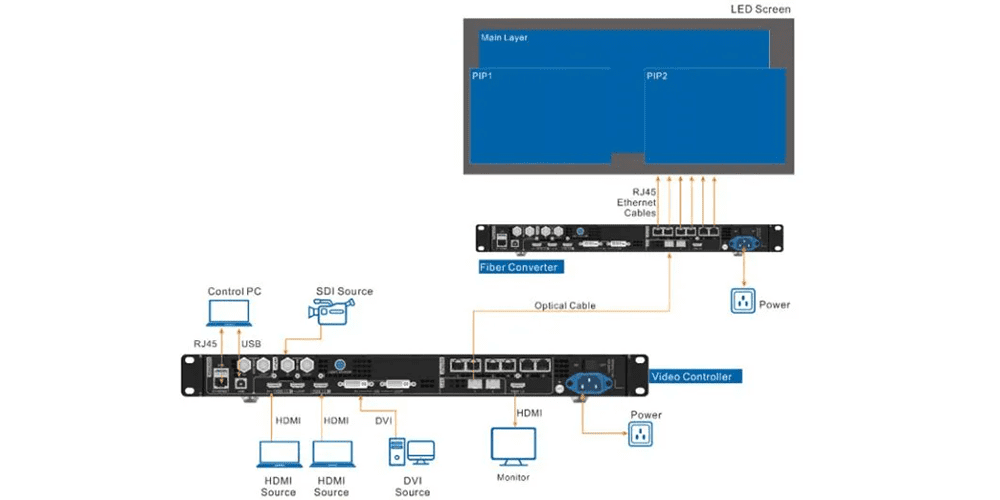
OPT 1 can operate as a fiber output, and OPT 2 can copy or back up the Ethernet output. Choose the mode for the actual connection diagram and use matched single-mode or multi-mode modules and cables.
7.NovaStar VX600 FAQs
Q1: What is NovaStar VX600 used for?
The VX600 is an all-in-one LED display controller that processes and sends video signals to LED screens.
Q2: How many Ethernet outputs does VX600 have?
It has 6 Ethernet ports, supporting a wide range of screen connections.
Q3: Can NovaStar VX600 support 4K video?
Do not treat it as a general-purpose 3840 x 2160 at 60 Hz HDMI controller. The standard HDMI and DVI input limit is 1920 x 1200 at 60 Hz. OPT 1 supports specific 4K x 1K or dual 2K x 1K input arrangements with compatible equipment; that is different from full UHD. The output remains limited to 3.9 million pixels.
Q4: What makes VX600 different from other NovaStar controllers?
Its large pixel capacity, low latency, and all-in-one design make it more versatile than entry-level models.
Q5: Where can I buy NovaStar VX600?
From official NovaStar distributors or trusted LED display suppliers like EagerLED.
8.In conclusion
The NovaStar VX600 is more than just a video controller—it’s a comprehensive LED display management solution. With 3.9 million pixel capacity, ultra-high resolution support, and advanced features like low latency, scaling, and pixel calibration, it is built to handle the most demanding LED screen applications.
Whether you’re managing a concert stage rental LED screen, installing a permanent LED billboard, or setting up a corporate video wall, the VX600 delivers reliability and professional performance.
For those looking to purchase genuine NovaStar products, partnering with a trusted LED display supplier such as EagerLED ensures you get not only authentic equipment but also expert support for your LED display projects.